WhatsApp Scales Passkey Authentication Worldwide to Protect Billions of Users From Credential Theft

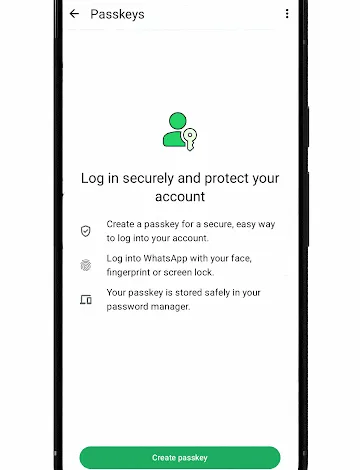
WhatsApp, the world’s leading instant messaging platform owned by Meta, has successfully integrated passkey-based authentication across its global infrastructure. Serving billions of users spanning diverse geographical regions, socioeconomic backgrounds, and varying levels of digital literacy, the platform adopted passkeys to replace traditional, vulnerable authentication mechanisms with a more secure, streamlined, and phishing-resistant alternative. This rollout represents one of the largest consumer-facing adoptions of public-private key cryptography to date, establishing a new benchmark for identity verification and account security at a global scale.
The Journey Toward Passwordless Security: A Chronology of Adoption

The initiative to overhaul WhatsApp’s registration and access framework began in earnest in 2023. Prior to this transition, the platform relied heavily on SMS-based One-Time Passwords (OTPs) alongside traditional PIN codes to authenticate users during registration and login. While ubiquitous, SMS OTPs presented persistent reliability challenges. In many developing regions, network infrastructure limitations frequently resulted in delayed or failed message deliveries, stranding users and preventing them from accessing essential communications. Furthermore, SMS-based verification remained vulnerable to sophisticated social engineering tactics, including SIM-swapping, interception, and phishing campaigns designed to harvest credentials.
Recognizing these vulnerabilities, WhatsApp’s Registration and Access team committed to pioneering a more resilient system. By early 2023, the engineering teams at WhatsApp and Google began laying the groundwork for passkey integration. The objective was clear: eliminate the friction of manual credential entry while dramatically increasing protection against account takeovers. By leveraging device-native capabilities—such as fingerprint sensors, facial recognition, and screen lock PINs—the companies sought to compress multi-step login procedures into a single, seamless biometric gesture.
Engineering and Client-Side Integration Challenges

Implementing passkeys for an audience of billions required navigating a complex ecosystem characterized by fragmented operating systems, diverse Original Equipment Manufacturer (OEM) implementations, and vast differences in hardware capabilities. Mayank Manuja, an Android Engineer on the WhatsApp Registration and Access team who spearheaded the design and implementation of passkey authentication, noted the sheer magnitude of the undertaking. According to Manuja, even minor adjustments to core workflows immediately impact billions of individuals worldwide, necessitating meticulous planning and rigorous testing.
To streamline client-side development, WhatsApp utilized Android’s Credential Manager API. This tool provided a unified interface that abstracted away the underlying complexities of various credential providers, normalizing request and response patterns for both creation and retrieval. However, engineering teams quickly encountered a myriad of edge cases during deployment. While standard "happy path" scenarios functioned smoothly from inception, supporting a globally diverse user base revealed unforeseen hurdles, including devices lacking screen locks, outdated Google Play Services, erratic exception handling, and inconsistent behavior across older Android iterations.
To overcome these obstacles, Google and WhatsApp engineers collaborated closely, refining user experience flows and conducting extensive A/B testing. Early iterations of the feature required complex onboarding prompts. As the Android operating system matured to support streamlined, single-screen experiences, WhatsApp simplified its user interface to eliminate redundant steps and reduce user confusion.

Server-Side Architecture and Cryptographic Implementation
Beneath the user-facing interface, WhatsApp engineered a robust backend architecture capable of processing high volumes of authentication requests simultaneously. The server-side logic is written in Erlang, interfacing natively with the Rust-based webauthn-rs library via a specialized foreign function interface. This Rust library handles computationally intensive cryptographic tasks, including signature verification and credential parsing, allowing the Erlang core to focus on orchestration, rate-limiting, business rules, and credential lifecycles.
The server architecture orchestrates WebAuthn and FIDO2 ceremonies through distinct Begin and Finish sequences split into two primary operational categories: registration and authentication. During the registration phase, the server issues creation options to the client, verifies the resulting attestation upon successful creation, and securely persists the credential. The system utilizes unique user handles and enforces exclusion lists to prevent redundant device enrollments.

Similarly, the authentication pipeline manages login requests by evaluating active assertions against stored public keys. When WebAuthn signals that a credential requires updating, the system dynamically refreshes stored records, ensuring uninterrupted access for the user. Furthermore, WhatsApp designed its infrastructure to support multi-passkey architectures, allowing users to maintain multiple valid credentials across different devices without triggering invalidation conflicts.
Rethinking Cross-Platform Synchronization and Ecosystem Strategy
A critical hurdle during the development phase involved cross-device synchronization. Standard WebAuthn specifications typically rely on scanning a QR code on one device and authenticating via Bluetooth on another. However, WhatsApp’s internal testing revealed that this Bluetooth-dependent transport mechanism was frequently unreliable. Moreover, users routinely confused the passkey QR codes with the existing WhatsApp Web linking interface, leading to widespread user error.

To circumvent these friction points, WhatsApp abandoned reliance on fragile cross-platform transport protocols. Instead, the platform leveraged native ecosystem storage mechanisms, allowing users to retain passkeys securely within cloud-backed credential managers such as Google Password Manager on Android and iCloud Keychain on iOS. When users transition to new devices or alternative platforms, the system prompts them to generate a fresh passkey during their subsequent sign-in. This approach preserves a frictionless user experience while operating seamlessly atop the multi-passkey server infrastructure.
Implications and Broader Industry Impact
The successful deployment of passkeys across WhatsApp carries profound implications for the broader cybersecurity landscape. By demonstrating that biometric-based, phishing-resistant authentication can be successfully scaled to billions of active users, WhatsApp has provided a blueprint for consumer technology platforms worldwide.

The security benefits of this transition are immediate and measurable. Passkeys eradicate the threat of credential stuffing and traditional phishing, as cryptographic keys cannot be intercepted or reused on fraudulent domains. Additionally, the mitigation of SMS OTP dependency solves persistent accessibility issues in regions with unstable telecommunications infrastructure, ensuring reliable account recovery and registration.
Industry analysts note that WhatsApp’s adoption accelerates the broader transition toward a passwordless digital ecosystem. As major consumer applications normalize biometric verification, user familiarity and adoption rates climb correspondingly. This behavioral shift reduces reliance on weak, easily memorized passwords that have historically served as the primary vector for corporate and consumer data breaches.
Future Outlook and Strategic Recommendations

Building upon the momentum of its initial launch, WhatsApp is actively expanding the utility of passkeys beyond standard registration and sign-in flows. Engineering roadmaps include the implementation of passkey-secured re-authentication for sensitive in-app operations, such as accessing encrypted chat backups and modifying critical account settings. Furthermore, WhatsApp continues to collaborate closely with platform partners to pioneer lower-friction credential creation pathways, anticipating that technical barriers to entry will continue to recede as hardware biometric sensors become ubiquitous.
For software engineers and enterprise architects preparing to implement passkeys at scale, the WhatsApp development team emphasizes several foundational best practices. Developers must account for ecosystem fragmentation early in the design phase, ensuring graceful fallbacks for unsupported hardware or legacy operating systems. Additionally, clear user education regarding the nature of passkeys—contrasting them with traditional passwords and multi-factor authentication methods—remains essential for driving organic adoption and long-term user retention.
As digital threats grow increasingly sophisticated, the widespread adoption of cryptographic, device-bound authentication by the world’s largest messaging platform marks a definitive milestone in the ongoing effort to secure global digital infrastructure.
Related posts: