Beware Security Threats Unleashed in the Browser
Beware security threats unleashed in the browser! Your browser, that seemingly innocuous window to the internet, can actually be a gateway for all sorts of digital nastiness. From sneaky phishing scams designed to steal your passwords to malicious malware that can hijack your entire system, the risks are real and often surprisingly sophisticated. This post dives deep into the common threats lurking in your browser and, more importantly, how you can protect yourself.
We’ll explore various attack vectors, from the classic phishing email to more insidious browser extensions carrying hidden payloads. We’ll also look at how vulnerabilities in the browser itself can be exploited, and the crucial role of regular updates and security settings. Get ready to tighten up your browser security – your digital life depends on it!
Types of Browser-Based Security Threats
Your browser, while a gateway to the internet’s vast resources, is also a prime target for various security threats. Understanding these threats and their mechanisms is crucial for staying safe online. This post will categorize common browser-based security threats, explaining how they work and what you can do to mitigate the risks.
Phishing Attacks
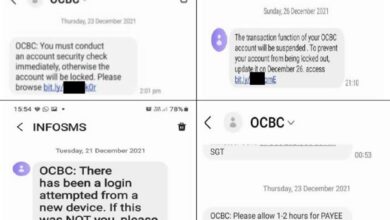
Phishing attacks are a prevalent form of social engineering designed to trick users into revealing sensitive information, such as usernames, passwords, and credit card details. These attacks often involve deceptive emails, websites, or messages that mimic legitimate entities.
| Threat Type | Description | Impact | Mitigation Strategy |
|---|---|---|---|
| Phishing | Deceptive attempts to acquire sensitive information such as usernames, passwords, and credit card details by masquerading as a trustworthy entity in electronic communication. | Identity theft, financial loss, data breaches. | Scrutinize emails and links carefully; verify sender authenticity; use strong passwords; enable two-factor authentication; be wary of unsolicited requests for personal information. |
Phishing attacks exploit human psychology, leveraging trust and urgency to manipulate users into clicking malicious links or entering data into fake login forms. The vulnerabilities exploited are primarily human vulnerabilities – a lack of awareness and critical thinking. For example, a phishing email might appear to be from your bank, urging you to update your account details by clicking a link that leads to a fake website.
Malware Infections
Malware, encompassing viruses, worms, trojans, and ransomware, can severely compromise browser security. These malicious programs can be downloaded unintentionally through infected websites, malicious advertisements, or drive-by downloads.
| Threat Type | Description | Impact | Mitigation Strategy |
|---|---|---|---|
| Malware (Viruses, Worms, Trojans, Ransomware) | Malicious software designed to damage, disrupt, or gain unauthorized access to a computer system. This can range from data theft to system crashes. | Data loss, system instability, financial loss, identity theft. | Install reputable antivirus and anti-malware software; keep software updated; avoid downloading files from untrusted sources; be cautious when clicking links or opening attachments; regularly back up your data. |
Malware often exploits vulnerabilities in outdated browser software or plugins. For instance, a drive-by download might exploit a zero-day vulnerability in a browser plugin to install malware without the user’s knowledge. The impact can range from minor system slowdowns to complete data loss and financial ruin.
Exploits Targeting Browser Vulnerabilities
Software vulnerabilities in the browser itself or its extensions can be exploited by attackers to gain unauthorized access to a system. These vulnerabilities might allow attackers to execute arbitrary code, steal data, or install malware.
| Threat Type | Description | Impact | Mitigation Strategy |
|---|---|---|---|
| Browser Exploits | Attacks that leverage vulnerabilities in the browser’s code or plugins to execute malicious code or gain unauthorized access. | Data theft, system compromise, malware installation. | Keep your browser and its plugins updated; use a reputable antivirus and anti-malware solution; enable browser security features like sandboxing and protection against cross-site scripting (XSS); practice safe browsing habits. |
These exploits often target known vulnerabilities that haven’t been patched by the browser vendor. Attackers might use sophisticated techniques to bypass security measures and gain control of the user’s system. A successful exploit could allow an attacker to remotely access sensitive information or install malware without the user’s interaction.
Cross-Site Scripting (XSS) Attacks
Cross-site scripting (XSS) attacks involve injecting malicious scripts into otherwise benign and trusted websites. These scripts can then be executed in the victim’s browser, potentially stealing cookies, session IDs, or other sensitive data.
| Threat Type | Description | Impact | Mitigation Strategy |
|---|---|---|---|
| Cross-Site Scripting (XSS) | Injection of malicious scripts into websites to steal user data or hijack sessions. | Session hijacking, data theft, redirection to malicious sites. | Implement robust input validation and output encoding on web applications; use a web application firewall (WAF); keep your browser and its plugins updated; be cautious about the websites you visit. |
XSS attacks exploit vulnerabilities in how websites handle user input. If a website doesn’t properly sanitize user-supplied data before displaying it, an attacker could inject malicious JavaScript code that executes in the victim’s browser. This can lead to session hijacking, data theft, and redirection to malicious websites.
Phishing Attacks and Browser Security

Phishing attacks represent a significant threat in the digital landscape, exploiting vulnerabilities in web browsers to deceive users and steal sensitive information. These attacks leverage the trust users place in familiar websites and brands to gain access to personal data, financial accounts, and other valuable assets. Understanding the techniques used in phishing attacks and how to identify them is crucial for maintaining online security.
Phishing attacks primarily target users through web browsers, exploiting their trust in familiar interfaces and leveraging psychological manipulation to trick individuals into revealing their credentials. These attacks often involve cleverly crafted emails, text messages, or website pop-ups designed to mimic legitimate sources. The goal is to induce the user to click a malicious link, download a harmful file, or enter sensitive information into a fake login page.
Common Phishing Techniques
Phishing attacks employ a variety of deceptive techniques. These range from simple, yet effective, approaches to sophisticated attacks that leverage social engineering and advanced technologies. Understanding these techniques is essential to improving your ability to spot and avoid phishing attempts.
One common tactic is to impersonate legitimate organizations. Phishing emails might appear to be from banks, online retailers, social media platforms, or government agencies. These emails often include urgent requests, warnings about account issues, or promises of rewards, all designed to create a sense of urgency and pressure the recipient into taking immediate action. Another technique is the use of spoofed websites, which mimic the appearance of legitimate sites to trick users into entering their login credentials or other personal information.
These fake websites often have very similar URLs to the real thing, differing only slightly in spelling or using a different top-level domain.
Browser Extensions and Phishing, Beware security threats unleashed in the browser
Browser extensions, while offering enhanced functionality, can also be exploited for phishing attacks. Malicious extensions can intercept user input, steal passwords, or redirect users to fake websites. These extensions may appear legitimate, offering seemingly useful features, but secretly contain malicious code that compromises user security. Once installed, these extensions can operate silently in the background, gathering data without the user’s knowledge or consent.
It’s crucial to only download extensions from trusted sources and to carefully review their permissions before installation.
Sample Phishing Email and Landing Page
To illustrate a typical phishing attack, consider this example:
Subject: Urgent Security Alert: Your [Bank Name] Account Has Been Compromised
Body: Dear Valued Customer, We have detected unusual activity on your [Bank Name] account. To prevent unauthorized access, please immediately verify your account details by clicking on the following link: [malicious link]. Failure to do so may result in the suspension of your account. Thank you for your cooperation.
The malicious link would lead to a landing page that closely resembles the legitimate bank’s login page. The page would include fields for username, password, and potentially other personal information such as security questions or account numbers. The design and branding would be meticulously crafted to mimic the real website, making it difficult for unsuspecting users to identify the fraud.
Identifying and Avoiding Phishing Attempts
Several steps can be taken to identify and avoid phishing attempts. These measures involve critical thinking, careful observation, and the use of security tools.
Always verify the sender’s email address and website URL carefully. Look for misspellings, unusual domain names, or inconsistencies in branding. Hover over links before clicking to see the actual URL destination. Legitimate organizations will rarely request sensitive information via email or unsecured websites. If you receive a suspicious email or encounter a suspicious website, contact the organization directly using a verified phone number or email address found on their official website to confirm the legitimacy of the communication.
Finally, keep your browser software and security software up to date to benefit from the latest security patches and protection against known threats.
Malware Delivered via Browsers

Browsers, while essential for accessing the internet, can unfortunately serve as vectors for malware delivery. Malicious websites, compromised browser extensions, and deceptive download links all pose significant risks. Understanding how these threats operate and implementing robust security practices is crucial for protecting your system.Malicious actors employ various techniques to infiltrate systems through browsers. This often involves exploiting vulnerabilities in browsers or leveraging user behavior through social engineering tactics.
The consequences can range from data theft and financial loss to complete system compromise.
Examples of Malware Delivered Through Browsers
Several examples illustrate the diverse ways malware can be delivered through browsers. Drive-by downloads, where malware is automatically downloaded and installed simply by visiting a compromised website, remain a common threat. These websites often exploit vulnerabilities in older or unpatched browser versions. Another significant threat is malicious browser extensions. These extensions, disguised as legitimate productivity tools or games, can secretly monitor browsing activity, steal sensitive data, or install further malware.
For instance, a seemingly innocuous extension promising to enhance browsing speed might secretly install a keylogger or crypto-miner. Finally, phishing attacks often involve malicious links embedded in emails or social media messages, leading to websites designed to trick users into downloading malware disguised as legitimate software.
Methods Used to Disguise Malicious Downloads and Links
Malicious actors employ sophisticated techniques to mask the true nature of their downloads and links. They often use social engineering tactics, creating websites and links that appear legitimate and trustworthy. This might involve mimicking well-known brands or organizations. The download itself might be disguised as a harmless file type, such as a PDF document or image, when it actually contains malware.
Another common technique is using shortened URLs, making it difficult to identify the true destination of the link. These obfuscation methods aim to trick users into downloading and executing malicious files without suspicion.
Common Indicators of Compromise (IOCs) Associated with Browser-Based Malware
Identifying potential threats is crucial for preventing infection. Several indicators can suggest a browser-based compromise. These include unexpected pop-ups or redirects, unusual browser behavior such as slow performance or crashes, the appearance of unfamiliar toolbars or extensions, and changes to your homepage or search engine settings without your consent. Additionally, an increase in system resource usage, especially CPU or memory, can indicate the presence of a crypto-miner or other resource-intensive malware.
Finally, suspicious network activity, such as unexpected outbound connections to unfamiliar servers, should raise a red flag.
Best Practices for Downloading Files and Installing Software Safely
Safe downloading and installation practices are paramount. Always download software from trusted and verified sources, avoiding unofficial websites or file-sharing platforms. Pay close attention to file extensions and only download files from reputable developers. Verify the digital signature of software whenever possible. Before installing any software, carefully read the permissions requested and ensure you understand what the software will access.
Regularly update your browser and operating system to patch security vulnerabilities. Enable automatic updates whenever possible. Utilize a robust antivirus and anti-malware solution with real-time protection. And finally, exercise caution when clicking links, especially in emails or social media messages from unknown sources. Hover over links to view their destination URL before clicking.
Browser Exploits and Vulnerabilities: Beware Security Threats Unleashed In The Browser
Browsers, while essential for accessing the internet, are unfortunately frequent targets for malicious attacks. Their complex codebases and constant evolution create opportunities for attackers to exploit vulnerabilities, gaining unauthorized access to sensitive data or compromising system integrity. Understanding these vulnerabilities and how to mitigate them is crucial for maintaining online security.Software vulnerabilities in browsers are essentially flaws in the browser’s code that attackers can leverage to bypass security measures and execute malicious code.
These vulnerabilities can range from minor inconveniences to severe security breaches, enabling attackers to steal passwords, install malware, or even take complete control of a user’s system. Attackers actively search for these weaknesses, often using automated tools to scan for and exploit them before software developers can patch them. The speed at which these vulnerabilities are discovered and exploited highlights the importance of proactive security measures.
Common Browser Vulnerabilities and Their Impact
Several common types of browser vulnerabilities exist, each with the potential for significant negative consequences. For example, memory corruption vulnerabilities, like buffer overflows, can allow attackers to inject malicious code into the browser’s memory, potentially leading to arbitrary code execution. Cross-site scripting (XSS) vulnerabilities allow attackers to inject malicious scripts into websites viewed by users, enabling them to steal cookies, session IDs, or other sensitive data.
SQL injection vulnerabilities, while often associated with web servers, can also affect browsers if poorly designed web applications fail to sanitize user input correctly. The impact of these vulnerabilities can range from simple data theft to complete system compromise, depending on the severity of the vulnerability and the attacker’s skill. A successful exploit could lead to identity theft, financial loss, or the installation of ransomware, crippling a user’s computer and demanding payment for access.
Patching and Updating Browsers
Regularly patching and updating browsers is arguably the single most effective way to mitigate the risk of browser exploits. Software updates often include security patches that address newly discovered vulnerabilities. Browser vendors, such as Google (Chrome), Mozilla (Firefox), and Microsoft (Edge), release updates frequently, often automatically. Users should ensure that their browser’s automatic update feature is enabled to receive these critical security patches promptly.
Manually checking for updates periodically is also a good practice, especially if automatic updates are disabled or unreliable. Ignoring updates leaves your browser vulnerable to known exploits, significantly increasing your risk. The process usually involves a simple click of a button or a restart of the browser after the download completes.
Utilizing Browser Security Settings
Beyond updates, browser security settings offer additional layers of protection. These settings control various aspects of browser behavior, such as the handling of cookies, pop-ups, and JavaScript. For instance, disabling or carefully managing JavaScript can reduce the risk of XSS attacks. Enabling features like phishing and malware protection can help block malicious websites and downloads. Regularly reviewing and adjusting these settings according to your risk tolerance is essential.
Browsers often provide detailed documentation explaining the function of each setting. Carefully considering the implications of each setting before modification is recommended, as overly restrictive settings can hinder the usability of the browser. A balanced approach that provides adequate security without excessive inconvenience is ideal.
Browsers are increasingly becoming a battleground for security threats, making robust application development crucial. For secure, scalable solutions, consider exploring the innovative approaches discussed in this article on domino app dev the low code and pro code future , which emphasizes building secure applications. Ultimately, safeguarding against browser-based attacks requires a multifaceted strategy, including secure coding practices and a keen awareness of emerging threats.
Protecting Yourself from Browser-Based Threats
Navigating the digital world exposes us to a constant barrage of potential security threats. Our web browsers, the gateways to this online landscape, are unfortunately prime targets for malicious actors. Understanding how to protect yourself is crucial to maintaining your online security and privacy. This section Artikels key strategies and best practices to minimize your risk.
Implementing robust security measures isn’t about being paranoid; it’s about being proactive. A multi-layered approach combining technical safeguards with responsible online behavior significantly reduces your vulnerability to browser-based attacks.
Browser Security Best Practices Checklist
Regularly reviewing and updating your browser security settings is essential. This checklist provides a comprehensive guide to ensuring your browser is configured for optimal protection.
- Keep your browser updated: Software updates often include critical security patches that address known vulnerabilities. Enable automatic updates to ensure you always have the latest security features.
- Use a reputable antivirus and anti-malware program: These programs provide real-time protection against malware, viruses, and other threats that might try to infiltrate your system through your browser.
- Enable browser security features: Most modern browsers offer built-in security features like phishing and malware protection, pop-up blockers, and sandboxing. Ensure these are enabled and configured appropriately.
- Be cautious about browser extensions and add-ons: Only install extensions from trusted sources and regularly review the permissions granted to each extension. Remove any extensions you no longer use.
- Regularly clear your browsing history, cache, and cookies: This helps prevent tracking and removes potentially malicious files that might be lingering on your system.
- Use a strong password manager: A password manager helps you create and securely store complex, unique passwords for each of your online accounts, reducing the risk of credential theft.
Safe Browsing Habits
Beyond technical measures, responsible online behavior is crucial for minimizing your risk. These habits can significantly reduce your exposure to threats.
- Avoid suspicious websites and links: Be wary of websites with unusual URLs, misspellings, or requests for personal information. Avoid clicking on links from unknown or untrusted sources.
- Think before you click: Take a moment to assess the legitimacy of a link or website before clicking. Hover over links to see the actual URL before clicking.
- Be cautious about email attachments: Never open email attachments from unknown or untrusted senders. Even attachments from known senders should be treated with caution if unexpected.
- Practice safe file downloads: Only download files from trusted sources. Scan downloaded files with your antivirus software before opening them.
- Enable HTTPS everywhere: Prefer websites using HTTPS (indicated by a padlock icon in the address bar), which provides encryption to protect your data during transmission.
Strong Passwords and Multi-Factor Authentication
Using strong, unique passwords and implementing multi-factor authentication (MFA) are fundamental aspects of online security. These measures significantly enhance your protection against unauthorized access.
Strong passwords should be long (at least 12 characters), complex (combining uppercase and lowercase letters, numbers, and symbols), and unique to each account. Avoid using easily guessable information like birthdays or pet names. For example, a strong password might look like this: `P@$$wOrd123!`.
Multi-factor authentication adds an extra layer of security by requiring a second form of verification beyond your password, such as a one-time code sent to your phone or email, a biometric scan (fingerprint or facial recognition), or a security key. Enabling MFA wherever possible significantly reduces the risk of account compromise, even if your password is stolen.
Securing Your Browser and Browsing Experience: An Infographic Description
Imagine a layered infographic, visually representing the concentric circles of browser security. The innermost circle represents the browser itself, with labels indicating key settings: “Automatic Updates Enabled,” “Pop-up Blocker On,” “Phishing & Malware Protection Active,” “HTTPS Everywhere Enabled.” The next circle outwards depicts safe browsing habits: “Verify Website Legitimacy,” “Avoid Suspicious Links,” “Be Cautious of Attachments,” “Only Download from Trusted Sources.” The outermost circle highlights password security: “Use a Password Manager,” “Create Strong Unique Passwords,” “Enable Multi-Factor Authentication.” Arrows connect the layers, illustrating how each element contributes to a comprehensive security strategy.
The central image could be a strong, impenetrable shield symbolizing the overall security of the browser and browsing experience. A caption at the bottom could read: “A Multi-Layered Approach to Browser Security.”
Browser Security Extensions and Tools
Your browser is the gateway to the internet, and securing it is paramount. While browsers themselves offer built-in security features, browser extensions and tools provide an extra layer of protection, enhancing your online safety and privacy. Choosing the right tools, however, requires understanding their capabilities and potential drawbacks.
The world of browser security extensions is vast and varied. Some focus on blocking ads and trackers, others on managing passwords, and still others on detecting and preventing malicious websites. This diversity makes it crucial to carefully consider your needs and choose extensions from reputable developers.
Reputable Security Extension Features and Functionalities
Reputable browser security extensions share several key features. These typically include real-time protection against phishing attempts, malware detection, and the blocking of malicious scripts. Many also offer features such as password management, secure browsing modes, and privacy enhancements like tracker blocking and cookie management. Strong encryption and regular updates are also vital characteristics of trustworthy extensions. These extensions usually undergo rigorous testing and are transparent about their data collection practices.
For example, a reputable extension might highlight suspicious URLs in real-time, prevent access to known malicious sites, and provide detailed reports on blocked threats.
Risks Associated with Less-Known Security Extensions
Using less-known security extensions presents several risks. These extensions may lack proper security audits, potentially introducing vulnerabilities into your browser. Some may collect and sell your browsing data without your knowledge or consent, compromising your privacy. Others might be poorly coded, leading to performance issues or even browser crashes. Furthermore, some may even contain malicious code disguised as a security tool, acting as a backdoor for hackers.
It’s crucial to only install extensions from trusted sources and developers with a proven track record. Reading user reviews and checking the extension’s permissions are essential steps before installation.
Comparison of Browser Security Extensions
The following table compares five popular browser security extensions, highlighting their features, strengths, and weaknesses. Remember that the effectiveness of these extensions can vary depending on individual browsing habits and the ever-evolving landscape of online threats.
| Extension Name | Features | Strengths | Weaknesses |
|---|---|---|---|
| uBlock Origin | Ad blocking, tracker blocking, malware blocking | Highly effective ad and tracker blocking, lightweight, open-source | Can sometimes break website functionality, requires some configuration |
| Privacy Badger | Tracker blocking, anti-fingerprinting | Focuses on privacy, effective tracker blocking, open-source | Might not block all trackers, can impact website performance |
| NoScript | Javascript blocking, enhanced security | Strong security against cross-site scripting attacks, highly configurable | Requires technical knowledge to use effectively, can break website functionality |
| HTTPS Everywhere | Enforces HTTPS connections | Improves security by forcing encrypted connections where available | May not work with all websites, some websites may be inaccessible |
| Password Manager (e.g., Bitwarden, LastPass) | Password generation, storage, and autofill | Improved password security, convenient password management | Requires trusting the extension with your passwords, potential security risks if compromised |
The Role of Browser Updates in Security
Keeping your browser updated is paramount to maintaining a secure online experience. Outdated browsers are riddled with vulnerabilities that hackers actively exploit to gain access to your system and steal your data. Regular updates patch these security holes, significantly reducing your risk of falling victim to online threats. Think of it as regularly servicing your car – neglecting maintenance invites trouble down the road.Browser updates introduce not only security patches but also performance improvements and new features.
These updates often address critical vulnerabilities that could expose your personal information, financial details, and even your entire system to malicious actors. Ignoring updates leaves your digital life exposed and vulnerable.
Automatic Browser Updates
Most modern browsers offer automatic update functionality. This feature ensures your browser is always running the latest, most secure version. The process is typically seamless and happens in the background, requiring minimal user intervention. Automatic updates are generally enabled by default, but it’s always wise to verify this setting within your browser’s preferences. For example, in Chrome, you can find these settings under “Settings” -> “About Chrome”.
The browser will automatically check for and download updates, then restart itself to apply them. This automated process minimizes the effort required from the user while maximizing their security.
Consequences of Using Outdated Browsers
Using an outdated browser exposes you to a wide range of security risks. These risks include increased susceptibility to phishing attacks, malware infections, and exploitation of known vulnerabilities. For instance, an outdated browser might fail to recognize and block malicious websites designed to steal your credentials. Furthermore, outdated browsers often lack support for modern security protocols, leaving you vulnerable to man-in-the-middle attacks.
The consequences can range from identity theft and financial loss to complete system compromise. A real-world example is the widespread exploitation of the Flash Player vulnerability before its official deprecation; users who hadn’t updated were particularly vulnerable.
Checking for and Installing Browser Updates
The process of checking for and installing browser updates varies slightly depending on the operating system and the specific browser. However, the general steps are similar. For most browsers, you can usually find the update mechanism by navigating to the browser’s “Settings” or “About” menu. For example, in Chrome (Windows, macOS, Linux): navigate to “Settings” -> “About Chrome”.
The browser will automatically check for updates. If an update is available, it will download and install it automatically, prompting you to restart the browser to complete the process. Similar processes exist for Firefox, Edge, and Safari, with minor variations in menu locations. Regularly checking for updates, ideally monthly, is a simple yet highly effective way to improve your online security.
Concluding Remarks
So, are you ready to surf the web with a newfound sense of security? Remember, your browser is the front line of your digital defense. By understanding the threats and implementing the simple yet effective strategies discussed here – keeping your software updated, being wary of suspicious links, and utilizing browser security extensions – you can significantly reduce your risk of falling victim to online attacks.
Stay vigilant, stay informed, and stay safe online!
Query Resolution
What is a browser exploit?
A browser exploit is a piece of code that takes advantage of a vulnerability in your browser’s software to gain unauthorized access to your system or data.
How often should I update my browser?
Ideally, you should enable automatic updates for your browser. However, manually checking for updates at least once a month is a good practice.
Are all browser extensions safe?
No, some browser extensions can be malicious. Only download extensions from reputable sources and read reviews before installing them.
What should I do if I think I’ve been phished?
Immediately change any passwords you think might have been compromised. Monitor your bank accounts and credit reports for any unusual activity. Consider running a malware scan.