10 Ways to Ensure Employee Security
10 ways to ensure your employees practice excellent security. This comprehensive guide covers crucial aspects of employee security, from training and password policies to physical security and incident response planning. Protecting your company’s valuable assets starts with empowering your workforce with the knowledge and tools to maintain robust security practices.
A strong security culture is built on a foundation of awareness and consistent training. This guide will provide concrete steps and strategies to bolster your employees’ security posture, ultimately safeguarding your organization from potential threats.
Employee Security Awareness Training
A robust security awareness training program is crucial for any organization. It’s not just about ticking a box; it’s about fostering a culture of security consciousness among employees. By equipping them with the knowledge and skills to identify and avoid security threats, organizations can significantly reduce the risk of data breaches and other security incidents.Effective training goes beyond simple lectures; it must be engaging, interactive, and tailored to the specific roles and responsibilities of different employees.
This ensures that the training is relevant and impactful, driving tangible improvements in security practices. This approach also helps employees understand how their actions directly contribute to the overall security posture of the organization.
Creating a Compelling Security Awareness Training Program
A compelling security awareness training program should employ diverse methods to maintain employee engagement. These methods can range from interactive simulations to gamified exercises, ensuring that learning is both effective and enjoyable. This multifaceted approach will resonate with a wider range of learning styles, fostering a deeper understanding of security concepts.
- Interactive Simulations: Simulations that mimic real-world phishing attacks or social engineering scenarios are highly effective. Employees can practice identifying suspicious emails, links, or phone calls in a safe environment, improving their ability to spot potential threats. This hands-on approach fosters a deeper understanding of these threats and their potential consequences.
- Gamified Exercises: Incorporating game mechanics like points, badges, and leaderboards can make learning more fun and competitive. This encourages active participation and reinforces security concepts in a lighthearted manner.
- Short, Frequent Modules: Breaking down complex topics into shorter, more digestible modules improves comprehension and reduces cognitive overload. This allows employees to absorb information incrementally and retain it more effectively.
- Real-World Case Studies: Sharing real-life examples of security breaches and their consequences helps employees understand the potential impact of their actions. These cases can highlight the tangible costs of security failures and underscore the importance of vigilance.
- Video Tutorials: Short, engaging videos can explain complex security concepts in a visually appealing and accessible manner. They can also introduce employees to the latest threats and security best practices.
- Infographics and Visual Aids: Using visuals to present information can make security concepts easier to understand and remember. Infographics can simplify complex processes and highlight key security principles.
- Regular Updates: Security threats are constantly evolving. Regularly updating training content ensures employees are aware of the latest threats and best practices.
- Personalized Feedback: Providing feedback on quizzes and assessments allows employees to understand their strengths and weaknesses, and provides them with a targeted learning path. This tailored approach is more impactful and effective.
- Incentivize Participation: Offering rewards or recognition for participation and successful completion of training encourages employee engagement and reinforces the importance of security awareness.
- Continuous Learning Platforms: Implement a platform for continuous learning and knowledge reinforcement. This ensures employees are consistently updated on the latest security measures and best practices.
Tailoring Training Content to Different Roles
Tailoring training to specific job roles ensures that employees receive relevant information and understand how their work contributes to the overall security of the organization. This customized approach maximizes the effectiveness of the training program and aligns with the particular needs of each employee’s position.
- Executive Staff: Executives need a high-level overview of security risks and their potential impact on the organization’s bottom line. Training should focus on the strategic implications of security incidents and how they can affect the company’s reputation and financial performance.
- IT Staff: IT staff require in-depth knowledge of technical security measures, such as firewalls, intrusion detection systems, and data encryption. Training should focus on practical application and troubleshooting of these technologies.
- Customer Service Representatives: Customer service representatives need to understand how to handle sensitive customer data securely. Training should cover data handling policies and procedures, and emphasize the importance of confidentiality and discretion.
Interactive Exercises and Simulations
Interactive exercises and simulations are critical for reinforcing security concepts in a practical way. They provide a safe environment for employees to test their knowledge and apply their understanding of security best practices.
Thinking about 10 ways to bolster your employees’ security practices? Understanding recent vulnerabilities like the Azure Cosmos DB Vulnerability Details is crucial. Knowing the specifics of these exploits can help you tailor your training to address the specific weaknesses that threat actors are targeting. This knowledge, in turn, reinforces the importance of those 10 security measures you’ve put in place.
- Phishing Simulations: Simulate phishing emails to test employees’ ability to identify malicious links and attachments. Provide feedback and resources to help them recognize and avoid such threats in the future.
- Social Engineering Scenarios: Present scenarios where employees are faced with social engineering attempts. This helps them understand the psychological tactics used in these attacks and how to resist them.
- Data Breach Response Drills: Conduct mock data breaches to assess employees’ understanding of incident response procedures and their ability to contain and mitigate the damage.
Key Topics in Employee Security Training
A well-structured training program covers a range of crucial security topics. This table Artikels the key areas, their descriptions, examples, and assessment methods.
| Topic | Description | Examples | Assessment Method |
|---|---|---|---|
| Password Management | Best practices for creating and managing strong passwords. | Using a password manager, following password complexity guidelines, avoiding reuse of passwords. | Password strength check, quiz on password best practices, practical exercise in password creation. |
| Phishing Awareness | Recognizing and avoiding phishing attempts. | Identifying suspicious emails, links, and phone calls; understanding the tactics used in phishing attacks. | Phishing simulation, case studies of real-world phishing attacks, quiz on phishing techniques. |
| Social Engineering | Recognizing and resisting social engineering tactics. | Understanding psychological manipulation techniques used in social engineering; recognizing and avoiding impersonation attempts. | Social engineering simulation, scenario-based exercises, quiz on social engineering techniques. |
| Data Protection | Protecting sensitive data and maintaining confidentiality. | Following data handling policies; understanding the importance of secure data storage and transmission; using encryption where appropriate. | Case studies of data breaches, quiz on data protection principles, role-playing scenarios on handling sensitive information. |
Strong Password Policies and Practices

Protecting your organization’s sensitive data starts with robust password policies. Weak passwords are a major vulnerability, easily exploited by hackers. Establishing and enforcing strong password policies is crucial for maintaining data security and preventing breaches. A well-defined password policy ensures consistent security practices across the entire organization.Password security is a continuous process. It’s not just about setting initial policies; it’s about regular updates, employee training, and vigilance in response to evolving threats.
This approach reinforces the importance of a proactive security posture.
Best Practices for Establishing Strong Password Policies
Password policies should be clear, concise, and consistently enforced. A strong policy significantly reduces the risk of unauthorized access to sensitive information. This section Artikels five key best practices.
- Minimum Length Requirements: Passwords should be of a sufficient length to deter brute-force attacks. A minimum length of 12 characters is generally recommended. Shorter passwords are significantly easier to crack.
- Complexity Requirements: A strong password should incorporate a combination of uppercase and lowercase letters, numbers, and symbols. This significantly increases the complexity and makes it harder to guess.
- Password Expiration Policies: Regular password changes force users to create new passwords, which reduces the risk of persistent breaches. A 90-day password expiration policy is often a good balance between security and usability.
- Password Reuse Prohibition: Preventing users from reusing passwords across different accounts is essential. A password reuse policy can prevent attackers from gaining access to multiple accounts if one is compromised.
- Avoid Common Passwords: Enforce a policy that prohibits the use of easily guessed or common passwords. Using a password checker can identify these and enforce a change.
Password Management and Reset Procedures
Secure password management and reset procedures are vital for employee productivity and security. This ensures that employees can access their accounts while maintaining the highest levels of security.
- Secure Password Reset Mechanisms: Implementing secure password reset mechanisms, like multi-factor authentication (MFA), adds an extra layer of security. This ensures only authorized users can reset their passwords.
- Automated Password Reset Tools: Utilize automated password reset tools to streamline the process. This reduces manual intervention and potential errors.
- Password Recovery Policies: Establish clear password recovery policies. These policies should include a procedure for handling lost or forgotten passwords.
Comparison of Password Management Tools
Different password management tools offer varying features and functionalities. Choosing the right tool depends on the specific needs of the organization.
- Password Managers: Password managers like LastPass, 1Password, and Bitwarden securely store and manage passwords. These tools often offer additional features such as secure note-taking, identity protection, and two-factor authentication. They significantly reduce the risk of password-related security incidents.
- Dedicated Password Management Systems: Organizations with significant data security needs may require a dedicated password management system. These systems can be tailored to specific organizational requirements, providing centralized control and auditing capabilities.
Password Complexity Requirements Table
This table demonstrates different password complexity requirements, highlighting their importance and justification.
| Requirement | Description | Example | Justification |
|---|---|---|---|
| Minimum Length | Passwords must contain at least a specified number of characters. | `Pa$$wOrd123` (10 characters) | Longer passwords are harder to crack using brute-force attacks. |
| Uppercase/Lowercase | Passwords must include both uppercase and lowercase letters. | `PaSsWoRd123` | Increases complexity by introducing more possible combinations. |
| Numbers | Passwords must contain at least one number. | `Pa$$wOrd123` | Adds an additional layer of complexity. |
| Symbols | Passwords must contain at least one symbol. | `Pa$$wOrd!123` | Further increases the complexity of the password, making it more resistant to attacks. |
Multi-Factor Authentication (MFA) Implementation
Implementing multi-factor authentication (MFA) is a crucial step in bolstering your company’s security posture. It adds an extra layer of protection beyond simple passwords, significantly reducing the risk of unauthorized access to sensitive data. This layer of defense is particularly critical in today’s increasingly complex threat landscape.Beyond just a technical solution, MFA fosters a culture of security awareness among employees.
When employees understand the importance of MFA and actively participate in its use, the overall security of the organization is enhanced. By employing MFA, organizations effectively deter attackers and safeguard valuable assets, including confidential information and intellectual property.
Benefits of Implementing MFA
Implementing MFA offers significant advantages, ranging from enhanced security to improved employee productivity. A strong MFA system effectively mitigates the risk of password breaches, phishing attacks, and social engineering tactics. By requiring multiple forms of verification, unauthorized access attempts are significantly hindered. Furthermore, MFA promotes a greater sense of security for both employees and the organization as a whole.
Choosing and Deploying an Appropriate MFA Solution
Careful consideration is required when selecting an MFA solution. Factors such as scalability, cost-effectiveness, integration capabilities, and ease of use must be carefully weighed. It is essential to select a solution that seamlessly integrates with existing systems and is manageable for employees. A robust support system and clear documentation are also critical components of a successful MFA implementation.
Steps for Choosing and Deploying MFA
- Thorough Assessment: Conduct a comprehensive assessment of your organization’s security needs and existing infrastructure. Consider factors such as the volume of users, the sensitivity of data, and the complexity of your IT environment.
- Solution Selection: Evaluate various MFA solutions based on the assessment. Consider vendor reputation, security certifications, and the ability to integrate with existing systems. Read reviews from other organizations to gain valuable insights.
- Pilot Program: Implement the chosen MFA solution on a small, controlled group of employees to test its functionality and identify any potential issues. Collect feedback from the pilot group to refine the implementation process.
- Training and Communication: Provide comprehensive training to all employees on how to use the MFA system. Clearly communicate the importance of MFA and its role in protecting the organization from threats. Regular reminders and updates can reinforce this message.
- Monitoring and Evaluation: Establish a system for monitoring the usage of MFA and evaluating its effectiveness. Track key metrics such as authentication attempts, successful logins, and any reported issues. Regularly review and update the MFA system based on performance data.
Potential Challenges in Implementing MFA and Solutions
Implementing MFA can present certain challenges. One common issue is user resistance to the additional authentication steps. Another hurdle is ensuring the system is compatible with existing infrastructure and applications. A well-defined communication plan can address user resistance by highlighting the added layer of security and the protection it provides.
Various MFA Methods and Their Pros and Cons
Various methods exist for implementing MFA, each with its own strengths and weaknesses. The best method will depend on your organization’s specific requirements.
- One-time Passwords (OTPs): OTPs, often delivered via SMS or email, provide an extra layer of security. However, reliance on SMS can be vulnerable to SIM swapping attacks. This vulnerability can be mitigated by employing stronger authentication mechanisms. OTPs are widely used due to their ease of implementation and broad compatibility with existing systems.
- Biometric Authentication: Biometric methods, such as fingerprint scanning or facial recognition, offer a high level of security. However, concerns about the accuracy and reliability of these methods need to be considered. Furthermore, there are privacy implications associated with collecting biometric data. The increased level of security they offer often justifies the implementation cost.
- Hardware Tokens: Hardware tokens, small physical devices that generate unique codes, provide a secure and reliable way to verify user identity. However, they require a significant investment in hardware. Hardware tokens provide a strong level of protection against phishing attacks and malware.
Secure Device Management
Protecting sensitive company data extends beyond passwords and software. Secure device management is a crucial layer of defense, encompassing policies and procedures for all devices used to access company resources. This proactive approach significantly reduces the risk of data breaches and ensures compliance with security regulations.
Best Practices for Managing Employee Devices
Effective device management involves a multi-faceted strategy that addresses both company-owned and personally-owned devices. It requires a balance between providing employees with necessary tools and ensuring the security of company data. Implementing clear, concise policies is paramount to achieving this balance.
Enforcing Security Policies on Company-Owned Devices
Company-owned devices, such as laptops and smartphones, are typically easier to manage. Policies can be implemented through software installed on the devices themselves. These tools can restrict access to specific files, control software installations, and automatically apply security updates. Regular audits and monitoring are also critical to identify and address any security gaps.
Enforcing Security Policies on Personally-Owned Devices
Managing security on personal devices is more complex due to the inherent variety and potential vulnerabilities. However, a combination of technical controls and clear communication can mitigate these challenges. Policies should Artikel acceptable use, data encryption, and device security measures. Educating employees on the importance of secure practices on personal devices is essential. A compromise on security practices on personal devices can have significant implications on the company’s overall security posture.
Importance of Regular Software Updates and Patch Management
Regular software updates and patch management are critical for maintaining a strong security posture. Vulnerabilities in outdated software are often exploited by malicious actors. Automating update processes, or establishing a schedule for these tasks is highly recommended, as well as regular patching of the OS and applications on company-owned devices. This proactive approach can prevent many potential security breaches.
Device Security Measures Comparison
| Device Type | Security Measure | Description | Implementation Steps |
|---|---|---|---|
| Laptops | Full Disk Encryption | Encrypts all data stored on the hard drive, rendering it inaccessible without the correct decryption key. | Install and configure a trusted encryption software; enforce password protection and strong authentication measures. |
| Smartphones | Mobile Device Management (MDM) | Provides centralized control and management of mobile devices, allowing for remote wipe, data encryption, and application control. | Deploy MDM software on compatible devices; define security policies within the MDM platform; train employees on the use of the MDM system. |
| Personal Devices | Acceptable Use Policy | A set of rules and guidelines outlining the permissible use of personal devices for accessing company data. | Develop a clear and comprehensive AUP; communicate the policy to all employees using the devices; monitor compliance and enforce consequences for violations. |
| All Devices | Regular Software Updates | Ensures that the operating system and applications are up-to-date with the latest security patches. | Establish a software update schedule; automate the update process where possible; train employees on the importance of prompt updates. |
Secure Network Access and Protocols
Protecting your company’s network is crucial in today’s digital landscape. Employees frequently access sensitive data and resources, making secure network access paramount. Robust protocols and access controls are essential to prevent unauthorized access and data breaches. Implementing these measures safeguards your organization’s reputation and financial stability.Network security protocols and access controls are not just about technical measures; they are about establishing a culture of security awareness within your organization.
Employees need to understand the importance of adhering to these protocols to protect sensitive data and resources.
Key Network Security Protocols for Employees
Understanding the protocols employed by your network is vital for employees to navigate it securely. These protocols form the backbone of your network’s security.
- Secure Shell (SSH): SSH is a cryptographic network protocol that allows secure remote login and other network services over an unsecured network. It encrypts all communication between the client and server, protecting sensitive data from eavesdropping. This protocol is crucial for remote access to servers and critical infrastructure.
- Secure Sockets Layer/Transport Layer Security (SSL/TLS): SSL/TLS protocols encrypt data transmitted between a web browser and a web server, ensuring confidentiality and integrity. This is essential for protecting sensitive information exchanged during online transactions, such as login credentials and financial data.
- Internet Protocol Security (IPsec): IPsec is a suite of protocols that provides security at the IP layer. It encrypts and authenticates IP packets, ensuring data integrity and confidentiality during communication between network devices. This is critical for VPN connections and secure communication between network segments.
- Virtual Private Network (VPN): A VPN creates a secure, encrypted connection over a public network, such as the internet. This allows employees to securely access the company network from remote locations. VPNs are essential for remote work and maintaining secure access to sensitive data.
- Domain Name System Security Extensions (DNSSEC): DNSSEC adds security to the DNS protocol. It verifies the authenticity of DNS records, preventing DNS spoofing and other attacks that can redirect users to malicious websites. This safeguards against phishing attempts and other related threats.
Restricting Access Based on Roles
Effective access control measures are essential to ensure only authorized individuals can access sensitive data and resources.
- Principle of Least Privilege: Employees should only have access to the data and resources they need to perform their job duties. This limits the potential damage from a compromised account. Restricting access to only necessary resources minimizes the risk associated with data breaches.
- Role-Based Access Control (RBAC): RBAC assigns specific permissions based on an employee’s role within the organization. This ensures that only authorized personnel can access specific data or perform certain actions. This allows for granular control over access and minimizes the risk of unauthorized access.
Securing Remote Access
Remote access to the company network presents unique security challenges. Protecting remote access is critical for maintaining business continuity and productivity.
- Multi-Factor Authentication (MFA): MFA adds an extra layer of security to remote logins, requiring multiple verification steps beyond a username and password. Implementing MFA for remote access adds an extra security barrier.
- Network Segmentation: Segmenting the network isolates sensitive data and resources into separate segments, reducing the impact of a security breach. This limits the spread of any potential malware or malicious activity within the network.
- Strong Passwords and Regular Password Changes: Employees should use strong, unique passwords for all accounts, including remote access accounts. Regular password changes help maintain security.
Importance of Strong Wi-Fi Security Protocols
Protecting your company’s Wi-Fi network is paramount. Ensuring a secure Wi-Fi environment safeguards the network from unauthorized access.
- WPA3/WPA2: Use the most current Wi-Fi security protocols (WPA3) to encrypt network traffic and protect against unauthorized access. This is essential to prevent unauthorized individuals from accessing your network and its resources.
- Strong Wi-Fi Passwords: Use complex, unique passwords for your Wi-Fi network. A strong password is essential to protect your network from unauthorized access.
- Disable Guest Access When Not in Use: Disable guest access to the network when not required. This helps prevent unauthorized access and protects the network from potential threats.
Data Protection and Handling
Protecting sensitive company data is crucial for maintaining a secure and trustworthy business environment. Data breaches can result in significant financial losses, reputational damage, and legal repercussions. Robust data protection strategies are essential to safeguard confidential information from unauthorized access and misuse.
Protecting Sensitive Company Data, 10 ways to ensure your employees practice excellent security
Effective data protection requires a multi-faceted approach. Implementing strong access controls, employing encryption, and establishing secure disposal procedures are key components of a comprehensive strategy.
- Data Loss Prevention (DLP) Solutions: Implement software that monitors and controls the movement of sensitive data within the organization. These systems can identify and prevent unauthorized transfer of confidential information outside the organization’s network.
- Regular Security Audits: Conduct periodic security audits to identify vulnerabilities in data protection systems and protocols. This proactive approach helps maintain the integrity of data handling procedures.
- Employee Training Programs: Educating employees about data protection policies and procedures is vital. Regular training reinforces awareness of risks and best practices, reducing the likelihood of human error.
Importance of Data Encryption
Data encryption is a fundamental security measure. It transforms readable data into an unreadable format, known as ciphertext, making it inaccessible to unauthorized individuals. This process is crucial for safeguarding sensitive information in transit and at rest.
Data encryption is essential to protect sensitive data from unauthorized access, even if the data storage device is compromised.
Encryption significantly mitigates the risk of data breaches, particularly if devices containing sensitive data are lost or stolen.
Handling and Disposing of Sensitive Documents
Proper handling and disposal of sensitive documents are critical. Organizations must have clear procedures in place to minimize the risk of unauthorized access or disclosure.
Thinking about 10 ways to ensure your employees practice excellent security? It’s crucial in today’s digital landscape. For example, consider the recent Department of Justice Offers Safe Harbor for MA Transactions, Department of Justice Offers Safe Harbor for MA Transactions , highlighting the importance of robust security protocols. Ultimately, implementing these 10 ways can significantly reduce your risk of breaches and keep your data safe.
- Secure Storage: Sensitive documents should be stored in secure locations, ideally with restricted access. This includes physical storage in locked cabinets or safes, and digital storage on encrypted servers or cloud systems.
- Shredding and Destruction: When documents are no longer needed, they must be properly disposed of. Shredding or other secure destruction methods prevent unauthorized individuals from retrieving confidential information.
- Data Sanitization: For electronic documents, data sanitization software can overwrite or erase sensitive data to prevent recovery. This process ensures the data cannot be retrieved even with advanced data recovery techniques.
Risks of Sharing Confidential Information on Unsecured Platforms
Sharing confidential information on unsecured platforms poses significant risks. Such platforms lack the necessary security measures to protect the data from unauthorized access, interception, or disclosure.
- Unauthorized Access: Unsecured platforms can be vulnerable to hacking or other malicious activities, allowing unauthorized individuals to access sensitive information.
- Data Breaches: Compromised platforms can lead to data breaches, exposing confidential information to the public and potentially causing substantial damage.
- Legal and Regulatory Violations: Sharing confidential data on unsecured platforms may violate legal and regulatory requirements, potentially leading to legal penalties and reputational harm.
Social Engineering Awareness
Social engineering, a deceptive tactic, manipulates individuals to divulge sensitive information or perform actions that compromise security. It relies on human psychology rather than technical vulnerabilities. Understanding these tactics is crucial for recognizing and thwarting attacks.Social engineering attacks are increasingly sophisticated, targeting employees through various channels, from emails to phone calls. Awareness and vigilance are vital defenses against this pervasive threat.
Common Social Engineering Tactics
Social engineering leverages various tactics to exploit human weaknesses. Understanding these tactics helps employees recognize and avoid potential traps.
- Phishing: A prevalent tactic involving deceptive emails or messages designed to trick recipients into revealing sensitive information, such as usernames, passwords, or credit card details. Criminals often impersonate legitimate organizations, creating a sense of urgency or fear to prompt immediate action.
- Baiting: This involves enticing victims with something of value, like a prize or a free gift, to trick them into performing a specific action that compromises security. For instance, a malicious link embedded within a seemingly attractive offer can lead to malware installation.
- Pretexting: This tactic involves creating a fabricated scenario to manipulate individuals into revealing confidential information. Attackers often impersonate legitimate authorities, such as a bank or IT support team, to gain access to sensitive data.
- Quid Pro Quo: This tactic involves offering a service or favor in exchange for information. For example, an attacker might pretend to be an IT support representative and offer to help solve a technical problem in exchange for login credentials.
- Tailgating: This is a physical security tactic where an attacker follows an authorized person into a restricted area. It relies on the trusting nature of individuals to avoid questioning unauthorized access.
Recognizing and Reporting Suspicious Communications
Identifying suspicious emails and messages is crucial to prevent security breaches. Look for clues that suggest something might not be genuine.
Thinking about 10 ways to ensure your employees are rock-solid on security? It’s crucial, of course, but don’t forget about the ever-evolving threat landscape. Modernizing your approach with tools like those highlighted in “Deploying AI Code Safety Goggles Needed” Deploying AI Code Safety Goggles Needed is key to keeping your systems secure. Ultimately, robust employee security practices and the right tech are the winning combination for staying ahead of the curve.
- Verify the sender’s identity. Check the email address and domain carefully, and compare it with known legitimate contacts. Misspellings or slight variations can indicate a spoofed address.
- Examine the email content for inconsistencies. Look for poor grammar, typos, and unusual language. A sense of urgency or pressure to act quickly might be a red flag.
- Be cautious of unexpected requests for sensitive information. Legitimate organizations rarely ask for passwords, account numbers, or social security numbers via email.
- Report any suspicious emails or messages to the appropriate security personnel immediately. This allows for swift investigation and mitigation of potential threats.
Importance of Verifying Information
Verification of information before acting is paramount to avoid social engineering attempts. Do not trust information at face value.
- Always double-check information from unknown sources. Contact the organization directly to confirm requests or information.
- Verify the legitimacy of links and attachments before clicking. Hover over links to see the actual destination URL.
- Think before you act. If a request seems unusual or suspicious, take a moment to assess the situation and seek clarification.
Social Engineering Attempts and Countermeasures
This table demonstrates various social engineering attempts, their descriptions, examples, and countermeasures.
| Attempt Type | Description | Example | Countermeasures |
|---|---|---|---|
| Phishing | Deceptive emails/messages seeking sensitive info. | Email from “Bank of America” asking for account details. | Verify sender’s identity, check for inconsistencies, never provide sensitive info via email. |
| Baiting | Enticing victims with rewards for actions. | “Free gift card” email with a malicious link. | Verify the offer, don’t click suspicious links, contact the organization directly. |
| Pretexting | Creating a fabricated scenario for info. | “IT support” calling to reset password. | Verify the caller’s identity, don’t share sensitive info without verification. |
| Quid Pro Quo | Offering services/favors for info. | “IT technician” offering help in exchange for password. | Verify the legitimacy of the request, don’t share information without verification. |
| Tailgating | Following an authorized person into a restricted area. | An attacker following an employee into the server room. | Be vigilant about who is around you, don’t let anyone enter restricted areas without proper authorization. |
Incident Response Planning
A robust security posture extends beyond preventative measures. Proactive planning for potential security incidents is crucial for minimizing damage and restoring operations quickly. An incident response plan acts as a roadmap for handling security breaches, guiding employees through the necessary steps and ensuring a coordinated response.
Importance of an Incident Response Plan
An incident response plan (IRP) is not just a theoretical document; it’s a vital tool for managing and mitigating the impact of security breaches. A well-defined IRP reduces chaos, minimizes downtime, and ensures compliance with regulations. Without a plan, organizations risk prolonged disruptions, financial losses, reputational damage, and legal repercussions. The plan should be tailored to the specific needs of the organization, considering its size, industry, and potential vulnerabilities.
Steps to Take in Case of a Security Breach
The IRP should Artikel clear steps to follow when a security incident occurs. These steps often include:
- Immediate Containment: Stopping the spread of the incident is paramount. This involves isolating affected systems, disabling compromised accounts, and preventing further data exfiltration. For example, if a malware infection is suspected, immediately disconnect the infected computer from the network to prevent the spread.
- Damage Assessment: Understanding the extent of the damage is crucial. This involves identifying compromised systems, data breaches, and the potential impact on operations. Inventorying affected systems, evaluating the types of data exposed, and analyzing the extent of financial losses or reputational damage are part of this step.
- Incident Reporting: Prompt reporting to relevant authorities (e.g., legal teams, regulatory bodies) is vital. Proper reporting follows established protocols to meet legal and regulatory obligations. For instance, if the breach involves sensitive customer data, reporting to data protection authorities is mandatory.
- Restoration: Restoring operations to normalcy is a key aspect of the incident response process. This involves recovering data, repairing compromised systems, and implementing security enhancements to prevent future incidents. A robust backup and recovery strategy is essential for minimizing downtime during this process.
Roles and Responsibilities of Employees in an Incident
Each employee plays a vital role in the incident response process. Clear roles and responsibilities are critical for a swift and effective response.
- Reporting Security Incidents: Employees should be trained to identify and report suspicious activities. This includes reporting unusual network traffic, phishing attempts, or compromised accounts. For example, if an employee receives a suspicious email, they should immediately report it to the IT security team.
- Following Established Procedures: Employees must adhere to the established incident response procedures. This involves isolating affected systems, reporting the incident, and assisting with the investigation as needed. Clear communication protocols are essential for a swift and effective response.
- Maintaining Confidentiality: Maintaining confidentiality is essential throughout the incident response process. Employees should refrain from discussing sensitive information with unauthorized individuals. This includes avoiding social media discussions about the incident.
Regular Testing and Updates of the Incident Response Plan
Regular testing and updating of the incident response plan are essential for its effectiveness.
- Testing the Plan: Conducting simulated security incidents, or table-top exercises, allows the organization to practice and refine its response procedures. Testing identifies gaps in the plan and ensures that employees are prepared to handle real-world incidents. These drills help employees understand their roles and responsibilities.
- Updating the Plan: Security threats and technologies are constantly evolving. Regular updates to the plan ensure it remains current and addresses emerging risks. This should include changes in security policies, new vulnerabilities, and updated procedures.
Physical Security Measures: 10 Ways To Ensure Your Employees Practice Excellent Security
Protecting your company’s physical assets is just as crucial as safeguarding digital information. Robust physical security measures deter potential threats and ensure the safety of employees, equipment, and sensitive data housed within your premises. This proactive approach contributes significantly to maintaining a secure and productive work environment.Physical security encompasses more than just locking doors. It involves a layered approach that includes access control, equipment security, and visitor management, all working together to create a strong defense against unauthorized access and potential harm.
Implementing these measures demonstrates a commitment to protecting both your company’s reputation and its valuable resources.
Access Control Systems and Procedures
Effective access control systems are essential for limiting physical access to sensitive areas within a company’s premises. These systems, combined with clear procedures, prevent unauthorized individuals from entering restricted zones, thereby reducing the risk of theft, damage, and data breaches. A well-defined access control system minimizes the potential for security incidents and enhances overall security posture. A strong access control system should involve multiple layers, including keycard systems, biometric scanners, or security guards.
Each system should have clearly defined procedures for access requests and approvals, ensuring transparency and accountability.
Securing Company Equipment and Documents
Protecting company equipment and documents from theft or damage is a critical component of physical security. Implementing appropriate security measures ensures the continued availability of essential resources and safeguards confidential information. Secure storage solutions for sensitive documents and equipment, including locked cabinets, safes, and secure rooms, are crucial. Regular audits and inventory checks of company equipment help identify missing or damaged items, facilitating timely responses to potential issues.
Labeling sensitive documents and equipment with clear markings can prevent unauthorized access and enhance security protocols.
Managing Visitor Access
Establishing clear visitor management procedures is essential to control access to company premises. A well-organized system for managing visitor access can minimize the risk of unauthorized individuals gaining entry and potentially compromising security. A dedicated visitor logbook, including visitor names, contact information, reason for visit, and time of arrival and departure, is crucial for tracking visitor activity. Employing visitor badges and escorting procedures for all visitors, especially those who do not work for the company, further strengthens visitor access control.
These measures contribute to a more secure and organized environment.
Regular Security Audits and Assessments
Staying ahead of evolving cyber threats requires a proactive approach to security. Regular security audits and assessments are crucial for identifying and mitigating vulnerabilities before they can be exploited. These assessments provide a snapshot of your organization’s current security posture, enabling you to make informed decisions and prioritize improvements. This proactive approach significantly reduces the risk of costly security breaches and data loss.
Importance of Regular Security Audits
Regular security audits are essential for maintaining a robust security posture. They help identify weaknesses and vulnerabilities in your security infrastructure and processes that might not be immediately apparent. These assessments enable you to proactively address potential threats, thereby strengthening the overall security of your organization. By systematically evaluating your security controls, you can ensure they are up-to-date and aligned with industry best practices.
Steps for Conducting a Security Audit
A comprehensive security audit involves several key steps. These steps should be followed meticulously to ensure a thorough and effective evaluation of your security controls. Firstly, define the scope of the audit, clearly outlining the systems, applications, and processes to be assessed. Secondly, gather relevant documentation and conduct interviews with personnel involved in the security processes. Thirdly, perform a thorough analysis of the identified vulnerabilities and weaknesses.
Finally, develop and implement recommendations to mitigate identified risks. This structured approach ensures a comprehensive and efficient audit process.
Identifying Vulnerabilities and Weaknesses
Identifying vulnerabilities and weaknesses is a critical component of any security audit. These weaknesses can stem from various sources, including outdated software, inadequate security configurations, or insufficient employee training. A systematic approach to vulnerability scanning, penetration testing, and security information and event management (SIEM) analysis helps pinpoint potential entry points for malicious actors. Understanding the root causes of vulnerabilities is essential for implementing effective mitigation strategies.
For instance, a misconfigured firewall could expose your network to unauthorized access.
Types of Security Assessments
Regular security assessments are vital to identify vulnerabilities in your security infrastructure and processes. A structured approach to evaluating your security controls is necessary to identify potential weaknesses and address them proactively. The following table Artikels different types of security assessments, their descriptions, their purpose, and their recommended frequency.
| Assessment Type | Description | Purpose | Frequency |
|---|---|---|---|
| Vulnerability Scanning | Automated scans of systems and applications to identify known security vulnerabilities. | Identify known vulnerabilities in software and configurations. | Monthly or quarterly |
| Penetration Testing | Simulated attacks to assess the effectiveness of security controls. | Evaluate the ability of security controls to withstand attacks. | Annually or semi-annually |
| Security Information and Event Management (SIEM) Analysis | Analysis of security logs to identify suspicious activities and patterns. | Identify malicious activities and potential threats. | Daily or weekly |
| Social Engineering Testing | Simulated social engineering attacks to assess employee awareness and responses. | Assess the susceptibility of employees to social engineering attacks. | Annually or semi-annually |
Outcome Summary
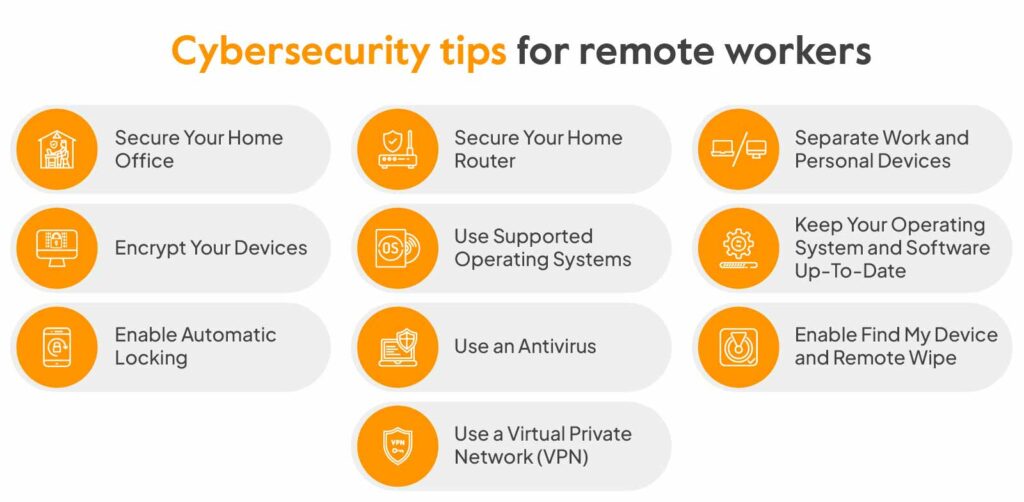
In conclusion, a proactive approach to employee security is paramount in today’s digital landscape. By implementing the ten strategies Artikeld in this guide, organizations can cultivate a culture of security awareness and resilience. Regular review and adaptation of these practices are essential to staying ahead of evolving threats and maintaining a secure environment for both employees and the company.
Commonly Asked Questions
What are some common social engineering tactics?
Common social engineering tactics include phishing emails, pretexting (creating a false scenario to gain information), and baiting (luring someone into a trap). These tactics exploit human psychology to manipulate individuals into divulging sensitive information or performing actions that compromise security.
How often should security audits be conducted?
The frequency of security audits depends on the specific risks and vulnerabilities of your organization. However, regular audits, at least annually, are crucial to identify and address potential weaknesses before they are exploited.
What are the key benefits of multi-factor authentication (MFA)?
Implementing MFA adds an extra layer of security, making it significantly harder for unauthorized individuals to access accounts even if they have a password. This greatly reduces the risk of unauthorized access and data breaches.
What are the most important physical security measures for a company?
Important physical security measures include access control systems, security cameras, and securing company equipment and documents. Strong visitor management policies are also vital.