Breakthrough at ISTA: Physicists Realize 20-Year-Old Theory to Achieve Fully Autonomous Quantum Entanglement

The architecture of future quantum computers may fundamentally depend on the capacity to seamlessly connect widely separated processing modules via distributed entanglement. Until recently, forging these critical interconnections demanded meticulous active control, precise timing, and repeated cycles of measurement and post-selection. However, a team of experimental physicists at the Institute of Science and Technology Austria (ISTA) has successfully demonstrated a fully autonomous alternative. By engineering a specialized "quantum bath" comprising a continuous stream of correlated particles of light, the researchers have bypassed the need for active intervention, opening a promising new pathway for scalable quantum networking.
Published in the peer-reviewed journal Physical Review X, the landmark experiment marks the first physical realization of a theoretical prediction first posited more than two decades ago. While the current prototype operates at an initial transfer efficiency of roughly 10 percent, the achievement bridges a long-standing gap between theoretical quantum optics and practical hardware implementation, potentially establishing a robust new foundation for fault-tolerant quantum technologies.
Understanding the Mechanics of Quantum Entanglement
Entanglement remains one of the most counterintuitive yet definitive phenomena in quantum physics, describing a state where two or more particles or systems share deep underlying correlations that cannot be accounted for by classical physics. When physical systems are entangled, the state of one instantly dictates the state of another, regardless of the spatial distance separating them. In the context of computational scaling, creating distributed entanglement between physically isolated quantum bits—or qubits—is widely considered an indispensable prerequisite for building modular quantum computers and expansive global quantum networks.
Prior to the ISTA breakthrough, attempts to entangle distant qubits traditionally adhered to one of two primary strategies. The first method involves sending a single, actively controlled photon from one physical qubit to another across a connecting channel. The second method requires each separated qubit to independently emit a photon, after which the two photons are captured and matched via optical interference in an effort to force the qubits into an entangled state.
This second methodology achieved profound scientific recognition when it formed the backbone of the experiments that earned the 2022 Nobel Prize in Physics. Despite its elegance, however, this technique remains stubbornly probabilistic. It relies heavily on repeated measurements and rigorous post-selection, meaning that even under optimal laboratory conditions, the process frequently fails to generate the desired entanglement, introducing bottlenecks that slow down quantum processing pipelines.
Chronology of a Two-Decade Quest
The journey from theoretical abstraction to laboratory reality spans more than twenty years, characterized by gradual advancements in materials science, microwave engineering, and photonics.
In the early 2000s, theoretical physicists working on open quantum systems and quantum optics began modeling the concept of dissipative engineering. Rather than isolating a quantum system from its environment—the traditional method used to prevent decoherence—the theory proposed utilizing the environment itself, or a engineered "quantum bath," to drive a system into a desired entangled state.
For nearly twenty years, however, the concept remained purely theoretical. The primary obstacle lay in the stark disparity between idealized mathematical models and the messy, imperfect realities of physical hardware. Constructing a quantum bath that could reliably generate and maintain continuous, correlated particles of light without introducing catastrophic noise or thermal disruption proved exceedingly difficult for early-generation laboratories.
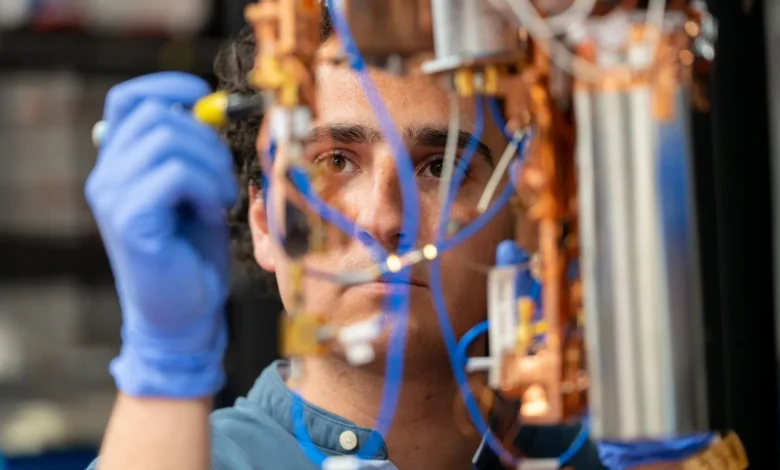
The turning point arrived when PhD student Alejandro Andrés-Juanes and Professor Johannes Fink, leading a team of international collaborators at ISTA, re-examined the problem. Rather than fighting environmental interaction, they sought to harness a controlled electromagnetic environment. Utilizing advanced superconducting circuits and precise microwave photon sources, the team spent years designing, testing, and refining a prototype capable of maintaining coherence long enough to sustain a continuous, bath-driven entangled state. Their successful integration and measurement of this system culminated in the recent publication in Physical Review X, finally validating a two-decade-old hypothesis.
Bridging Continuous-Variable and Discrete-Variable Systems
To appreciate the significance of the ISTA experiment, one must understand a foundational dichotomy in quantum information science: the distinction between continuous-variable and discrete-variable systems.
Continuous-variable entangled states—which can be intuitively compared to the continuous motion, position, and momentum of a physical pendulum—are relatively efficient to produce and highly accessible within optical laboratories. Conversely, many of the most powerful and sought-after quantum algorithms and error-correction protocols rely heavily on "discrete-variable" systems. These require distinct, "all-or-nothing" forms of quantum states that stationary qubits can utilize for logical operations.
For years, a major challenge in the field has been bridging the gap between these readily available continuous forms of entanglement and the discrete, localized forms required for practical computing applications.
"In this work, we aimed to overcome this mismatch between the readily available and the practically useful forms of entanglement," explains Alejandro Andrés-Juanes. "By stabilizing the entangled states remotely, our approach is fully autonomous and requires no active control or measurement."
By utilizing a shared source of correlated light particles, the research team successfully translated continuous-variable optical correlations into discrete-variable qubit synchronization, effectively solving an integration puzzle that had troubled experimentalists for years.
Harnessing a Quantum Bath of Microwave Photons
Maintaining both entanglement and fragile quantum coherence in the face of environmental noise is universally recognized as one of the most formidable hurdles in the development of practical quantum computers. Thermal fluctuations, stray electromagnetic fields, and material defects can easily destroy a quantum state, a process known as decoherence.
Rather than trying to completely isolate their qubits from the outside world, the ISTA researchers ingeniously made the surrounding environment—the quantum bath—directly responsible for both producing and stabilizing the entanglement.
"In our method, the quantum bath—meaning the qubits’ environment—is the source of entanglement. It creates a new ground state through a continuous stream of correlated photons," notes Professor Johannes Fink. "This way, the entangled qubit state is stabilized, even beyond the qubits’ own lifetime, and remains always available as a resource for further quantum processing. This makes the approach conceptually significant."
Because the entangled state is continuously replenished and sustained by the bath, it remains accessible whenever needed by the processor. This contrasts sharply with traditional entanglement protocols, which generate temporary states that must be utilized within a razor-thin temporal window before decoherence destroys them.
To couple the physical qubits efficiently with this engineered entangled photon source, the team utilized microwave photons. These low-energy particles of light are uniquely suited for manipulating delicate quantum information and already form the technological bedrock of leading superconducting-qubit architectures utilized by major technology firms and research institutions worldwide. Meanwhile, optical photons—higher-energy light particles commonly used in telecommunications—serve a different purpose and are expected to play a crucial role in carrying quantum information across vast distances via fiber-optic networks, an avenue also being actively explored by the Fink research group at ISTA.
Unlocking Hidden States Through Quantum Tomography
Confirming that two physically isolated qubits had indeed achieved synchronization inside the quantum bath required sophisticated measurement techniques. Because direct observation of a quantum system inherently alters its state, the researchers had to employ quantum tomography. This rigorous analytical procedure reconstructs the true state of a quantum system by examining statistical distributions across numerous distinct behavioral slices.
"Qubits can be in a superposition of states, but all these states collapse when we measure them, leaving us with a binary 0 or 1 state," Andrés-Juanes points out.
By leveraging advanced quantum tomography, the team executed rapid measurement cycles lasting merely 20 to 80 nanoseconds. These ultra-fast observations provided clear, empirical windows into the underlying dynamics of the synchronized qubits without disrupting the broader stabilizing mechanics of the quantum bath.
Broader Impacts and Future Implications for Quantum Computing
The successful realization of a functional quantum bath represents an important proof-of-concept milestone, but researchers emphasize that the technology remains in an early, developmental phase. At present, the prototype system transfers roughly 10 percent of the bath’s total available entanglement, meaning it does not yet match the raw efficiency of highly optimized, active-control protocols.
Nevertheless, the insights gained during the construction of the prototype have provided invaluable data regarding the real-world limitations of open quantum systems.
"Our experiments helped us reveal several factors that may have prevented scientists from designing a functional quantum bath using a single source of correlated photons for distributed entanglement," Fink explains.
Looking forward, the architectural implications of this research are profound. If scaled successfully, autonomous entanglement generation could drastically simplify the control electronics required for large-scale quantum computers. Today, scaling up quantum processors demands an explosion of complex wiring, real-time feedback loops, and precise active pulse controls—a configuration that introduces severe engineering and thermal management challenges inside cryogenic refrigerators.
An autonomous, bath-driven synchronization mechanism could alleviate this wiring crisis by letting the physical environment maintain qubit connectivity naturally. This reduction in control complexity brings the scientific community one step closer to realizing fault-tolerant quantum computers capable of executing complex calculations reliably on an industrial scale. As the ISTA team continues to refine their apparatus and explore integration with optical fiber networks, this 20-year-old theoretical concept stands poised to reshape the physical design of tomorrow’s quantum infrastructure.
Related posts: