The Drasi Project Leverages AI to Transform Documentation Testing into Proactive Monitoring

In the fast-paced world of open-source development, the initial encounter a new developer has with a project is often its "Getting Started" guide. This critical onboarding experience can be a make-or-break moment. If a command falters, unexpected output appears, or a step remains ambiguous, the typical user, faced with friction, will often abandon the project rather than invest time in filing a bug report. This was a challenge faced by the small, dedicated team of four engineers behind Drasi, a Cloud Native Computing Foundation (CNCF) sandbox project designed to detect data changes and trigger immediate reactions. Operating within Microsoft Azure’s Office of the Chief Technology Officer, the Drasi team prided itself on comprehensive tutorials, yet the rapid pace of code development outstripped their manual testing capabilities.
The stark reality of this documentation gap was dramatically underscored in late 2025. A significant update to GitHub’s Dev Container infrastructure, which mandated a higher minimum Docker version, inadvertently broke the Docker daemon connection for all existing configurations. This seemingly technical update had a cascading effect, rendering every single Drasi tutorial non-functional. Relying on manual testing, the team was initially unaware of the full extent of the disruption. Any developer attempting to engage with Drasi during this period would have encountered a dead end, leading to potential frustration and a loss of interest in the project. This incident served as a potent catalyst, forcing a fundamental reevaluation of their approach to documentation integrity. The realization emerged: with the advent of advanced AI coding assistants, the Sisyphean task of documentation testing could be transformed into a proactive monitoring problem.
The Persistent Problem: Why Documentation Fails
The fragility of software documentation, particularly for complex projects, can be attributed to several recurring issues. At its core, documentation often suffers from the "curse of knowledge," a phenomenon where creators, steeped in implicit understanding, overlook the foundational context essential for newcomers.

The Curse of Knowledge: Implicit Context Overlooks Newcomers
Experienced developers crafting documentation frequently operate under a veil of assumed knowledge. For instance, a phrase like "wait for the query to bootstrap" might be perfectly clear to a seasoned team member, who intuitively understands this involves running drasi list query, monitoring for a "Running" status, or even more directly, executing the drasi wait command. However, for a developer new to Drasi, or indeed for an AI agent attempting to interpret the instructions, this context is entirely absent. They are left to interpret instructions literally, struggling with the "how" when the documentation only addresses the "what." This disconnect leaves users stranded, unable to bridge the gap between the intended action and its practical execution.
Silent Drift: The Insidious Erosion of Accuracy
Unlike code, which often fails loudly and immediately when errors are introduced, documentation is susceptible to "silent drift." A simple example illustrates this: renaming a configuration file within a codebase typically triggers a build failure, providing instant feedback. Conversely, if documentation continues to reference the old filename, no immediate error occurs. This discrepancy accumulates silently, creating a growing chasm between the written word and the actual system behavior. This drift is particularly insidious for tutorials that rely on intricate, ephemeral environments spun up using tools like Docker, k3d, and sample databases. When any upstream dependency undergoes a change – a deprecated flag, a version bump, or a shift in default settings – these tutorials can break without any outward indication, only to be discovered when a user encounters confusion or failure.
The Innovative Solution: Synthetic Users Powered by AI
To overcome these persistent challenges, the Drasi team adopted a novel approach: treating tutorial testing as a simulation problem. They developed an AI agent designed to function as a "synthetic new user," meticulously mimicking the experience of a human encountering the documentation for the first time. This agent was endowed with three critical characteristics: it possessed no prior knowledge of the project, it was tasked with following instructions literally, and it was designed to provide detailed, actionable feedback.
The Technological Stack: GitHub Copilot CLI and Dev Containers
The implementation of this ambitious solution leveraged a powerful combination of cutting-edge technologies. GitHub Actions, Dev Containers, Playwright, and the GitHub Copilot CLI formed the core of the testing framework. The Drasi tutorials demanded a robust infrastructure, requiring the setup of services such as Kubernetes, a PostgreSQL database, and the Drasi agent itself. To accurately replicate the user experience, the testing environment had to be an exact replica of what human users encountered. If users were expected to operate within a specific Dev Container on GitHub Codespaces, the automated tests had to run within that identical Dev Container environment.
The Architecture: Simulating User Interaction
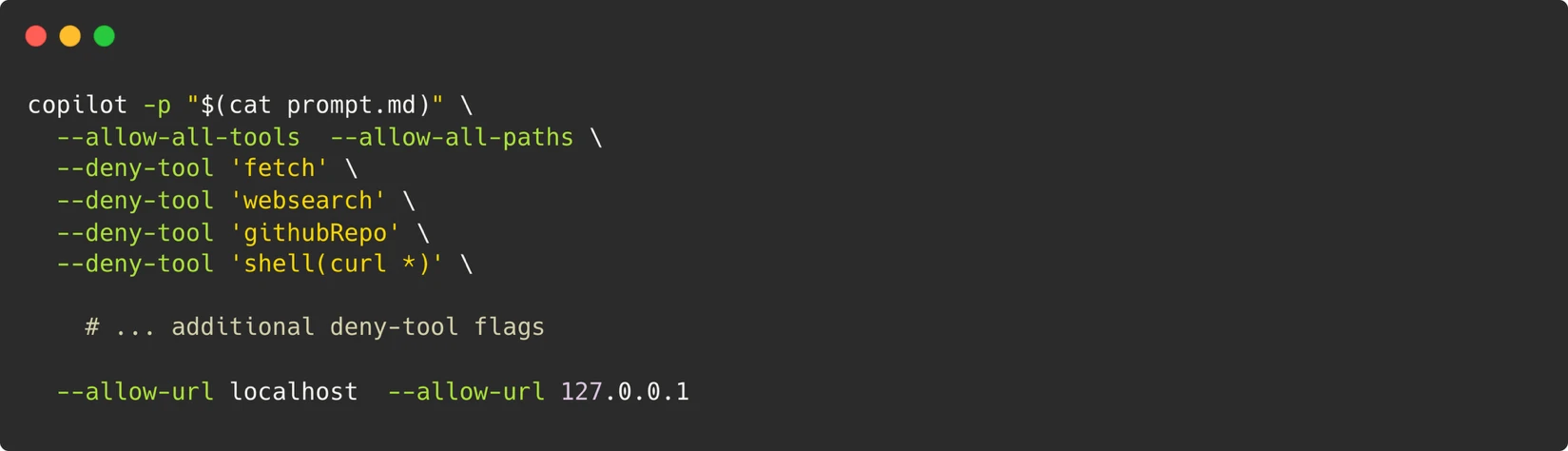
Within the isolated confines of the Dev Container, the AI agent was invoked using the GitHub Copilot CLI. A specialized system prompt, meticulously crafted to guide the agent’s behavior (available for review in the project’s GitHub repository), provided it with the necessary permissions and directives. This prompt, utilizing the CLI agent’s prompt mode (-p), equipped the agent with the ability to execute terminal commands, write files, and run browser scripts – essentially mimicking the actions of a human developer interacting with their terminal.
To enable the agent to navigate and interact with web pages, mirroring a human following tutorial steps, Playwright was integrated into the Dev Container. The agent was also programmed to capture screenshots, which were then systematically compared against those provided within the official documentation. This visual verification layer added a crucial dimension to the automated testing process.
A Robust Security Model: The Container as the Boundary
The security architecture of this system was built upon a single, inviolable principle: the container served as the definitive boundary. Rather than attempting to restrict individual commands – a notoriously difficult task when the agent requires the flexibility to execute arbitrary scripts for Playwright – the entire Dev Container was treated as an isolated sandbox. Control was exerted over what could traverse its boundaries. This included strict limitations on outbound network access, permitting only connections to localhost. A Personal Access Token (PAT) was configured with the minimal necessary permission, restricted solely to "Copilot Requests." Furthermore, ephemeral containers were utilized, ensuring they were destroyed after each test run. A critical safeguard involved a maintainer-approval gate for triggering workflows, adding an essential layer of human oversight.
Navigating Non-Determinism: Strategies for Reliability
One of the most significant hurdles in AI-driven testing is inherent non-determinism. Large Language Models (LLMs), by their probabilistic nature, can exhibit variability; an agent might retry a command in one instance and abandon it in another. The Drasi team addressed this challenge through a multi-pronged strategy:
- Retry with Model Escalation: A three-stage retry mechanism was implemented. Initially, the system would attempt the task with Gemini-Pro. If unsuccessful, it would escalate to Claude Opus. This provided a fallback mechanism, increasing the likelihood of success.
- Semantic Comparison for Screenshots: Instead of relying on pixel-perfect matching, which can be brittle, the system employed semantic comparison for screenshots. This allowed for more flexible and robust visual verification, accounting for minor variations.
- Verification of Core-Data Fields: The agent focused on verifying critical core-data fields rather than volatile values that might change between runs. This ensured that the fundamental functionality was validated, even if minor details shifted.
Moreover, the prompt engineering included a set of strict constraints designed to prevent the agent from embarking on undirected debugging journeys. Directives were incorporated to control the structure of the final report, and skip directives were included to allow the agent to bypass optional tutorial sections, such as the setup of external services.
Artifacts for Debugging: Preserving Evidence of Execution
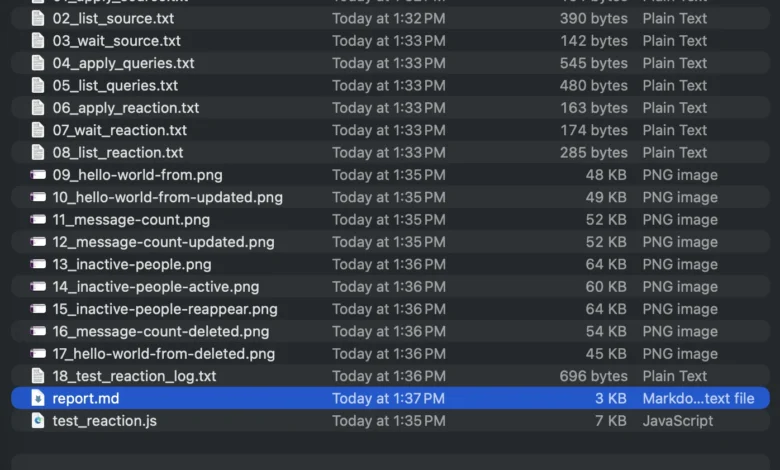
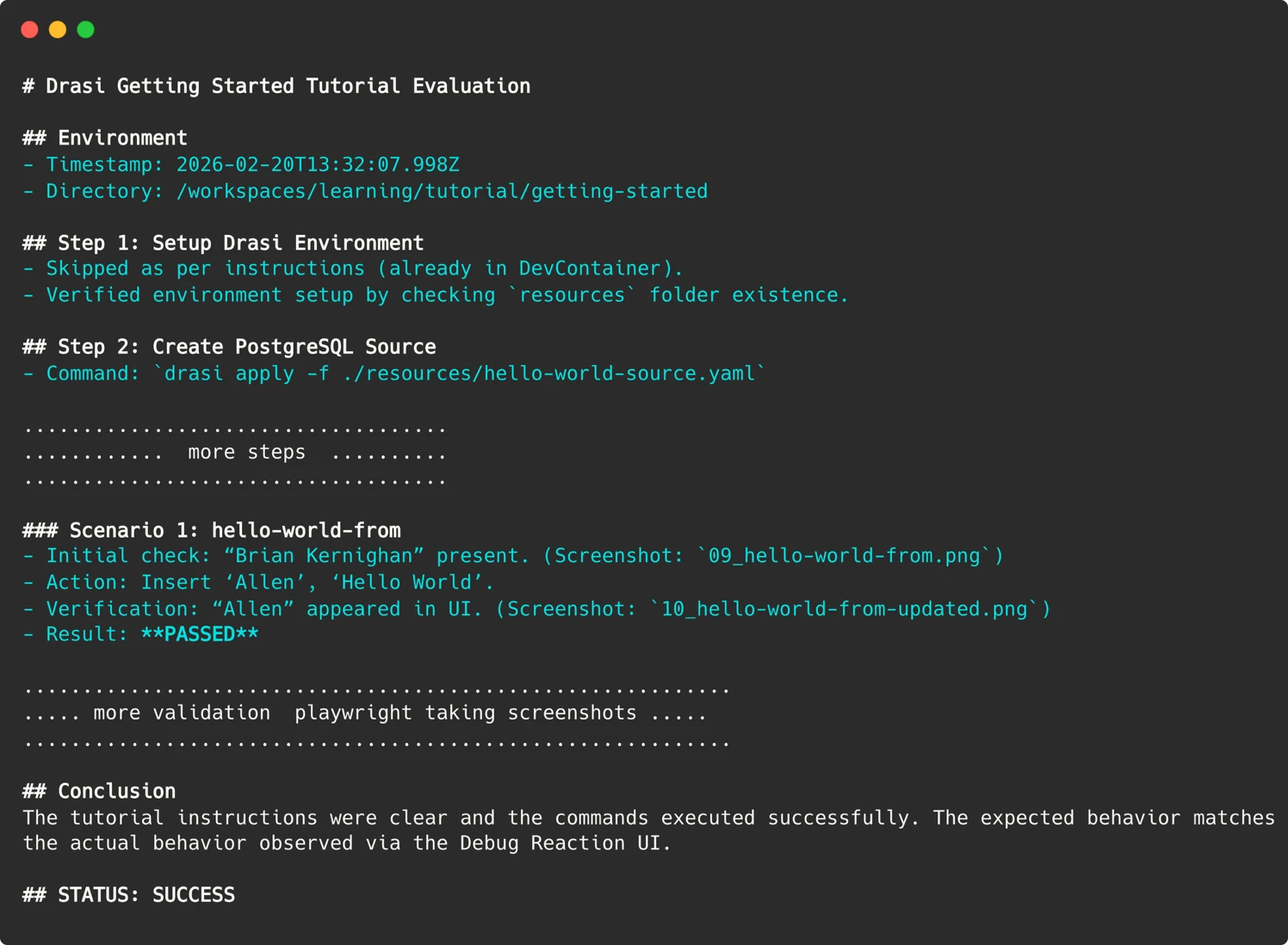
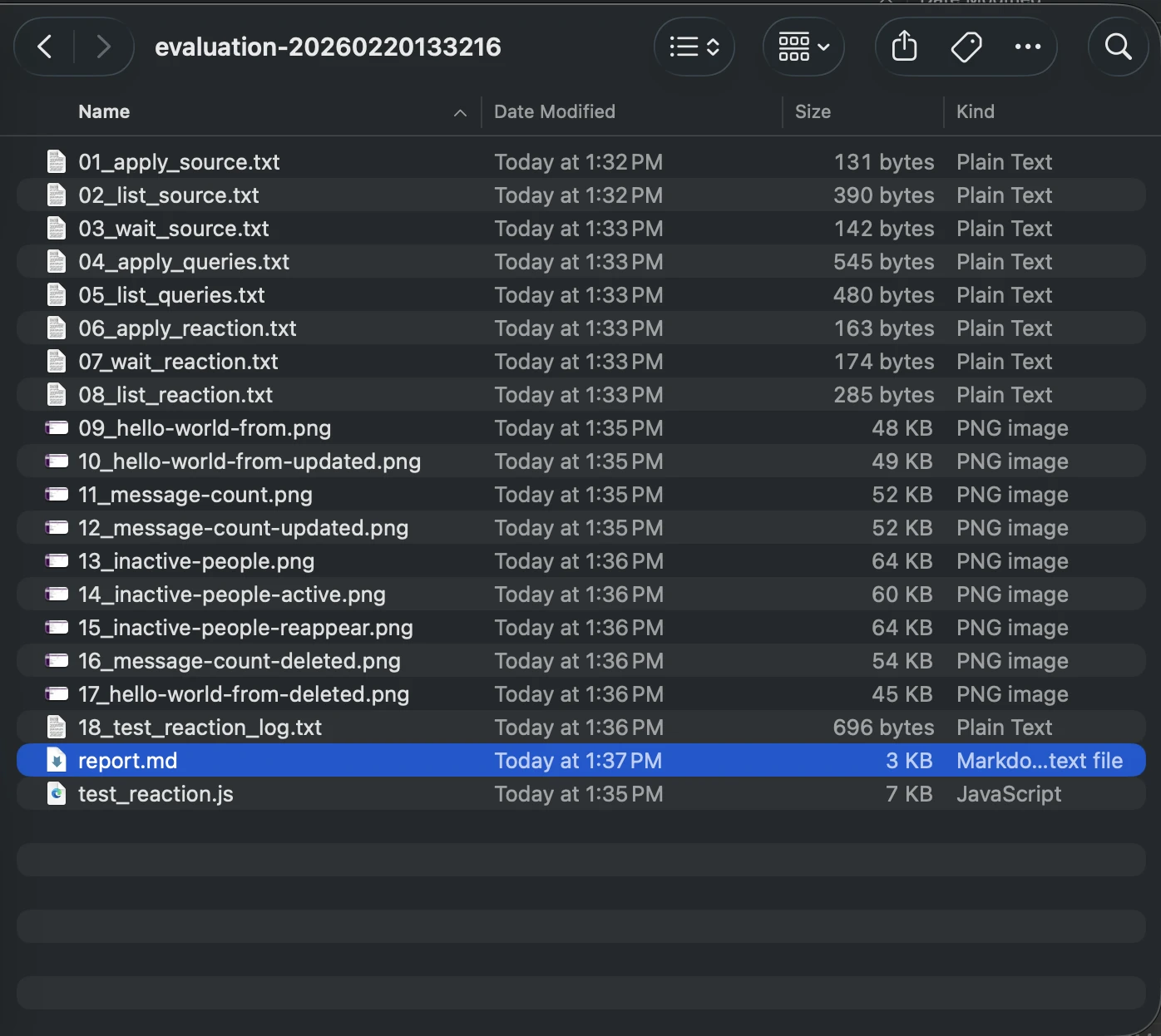
When a test run failed, understanding the root cause was paramount. Since the AI agent operated within transient containers, traditional SSH access for inspection was not feasible. To address this, the agent was programmed to preserve evidence from every run. This included screenshots of web user interfaces, terminal output of critical commands, and a comprehensive markdown report detailing the agent’s reasoning process.
These artifacts are meticulously uploaded to the GitHub Action run summary. This feature provides an invaluable "time travel" capability, allowing developers to revisit the exact moment of failure and observe precisely what the agent encountered.
Parsing the Agent’s Report: Bridging AI Nuance and CI Expectations
Achieving a definitive, machine-readable "Pass/Fail" signal from LLMs can be challenging. An agent might produce a lengthy, nuanced conclusion, making direct integration into CI/CD pipelines difficult. To render this actionable, significant prompt engineering was undertaken. The agent was explicitly instructed to provide a concise summary indicating success or failure.
In the GitHub Action workflow, a simple grep command is used to search for this specific string, thereby setting the exit code of the workflow. These seemingly simple techniques effectively bridge the gap between the fuzzy, probabilistic outputs of AI and the binary pass/fail expectations of continuous integration systems.
Automation: A Weekly Sentinel for Documentation Integrity
The culmination of this effort is an automated workflow that runs weekly, evaluating all Drasi tutorials. Each tutorial is assigned its own sandbox container, providing a fresh perspective from the AI agent acting as a synthetic user. If any tutorial evaluation fails, the workflow is configured to automatically file an issue on the Drasi project’s GitHub repository, ensuring prompt attention.
This workflow can also be optionally triggered on pull requests. However, to mitigate potential security risks, a maintainer-approval requirement is in place, alongside a pull_request_target trigger. This ensures that even for pull requests submitted by external contributors, the workflow executed is always the one residing in the project’s main branch. The execution of the Copilot CLI necessitates a PAT token, stored securely in the repository’s environment secrets. To prevent leakage, each run requires maintainer approval, with the exception of the automated weekly run, which operates exclusively on the main branch.
Uncovering Critical Issues: Bugs That Truly Matter
Since the implementation of this AI-driven testing system, the Drasi team has conducted over 200 "synthetic user" sessions. The AI agent has been instrumental in identifying 18 distinct issues. These have ranged from serious environmental configuration problems to more subtle documentation inaccuracies. Crucially, addressing these identified issues has not only improved the experience for the AI agent but has also directly benefited human users, enhancing the overall clarity and reliability of the project’s documentation.

AI as a Force Multiplier: Bridging the Gap in Human Resources
The narrative surrounding AI often centers on its potential to replace human workers. However, in the case of Drasi, AI has served as a profound force multiplier, providing a "workforce" that the small team simply did not possess. Replicating the functionality of their automated system – running six tutorials across fresh environments on a weekly basis – would necessitate a dedicated QA resource or a substantial budget for manual testing, both of which are unattainable for a four-person team.
By deploying these "Synthetic Users," the Drasi project has effectively gained a tireless QA engineer, one who operates without the constraints of time or human limitations, working through nights, weekends, and holidays. The Drasi tutorials are now consistently validated on a weekly cadence by these AI-powered synthetic users. Prospective users are encouraged to explore the "Getting Started" guide firsthand to witness the tangible results of this innovative approach. For projects grappling with similar documentation drift challenges, the GitHub Copilot CLI offers a compelling paradigm shift – not merely as a coding assistant, but as an intelligent agent capable of executing defined tasks. By providing it with a prompt, a controlled environment, and a clear objective, teams can delegate the essential, yet time-consuming, work that human resources may not be able to accommodate.