System administrators managing enterprise Windows environments are facing widespread operational disruptions following the deployment of Microsoft’s September 2026 Patch Tuesday cumulative updates. Across multiple versions of Windows Server, IT professionals have reported severe instability and total lockups within Remote Desktop Services (RDS). The malfunctioning updates are preventing legitimate users from establishing remote sessions, trapping active sessions in unresponsive states, and frequently necessitating drastic measures such as hard reboots to restore baseline server functionality.
The issue has sparked intense discussions across prominent community forums, including Reddit’s r/sysadmin and specialized technical channels, highlighting a critical infrastructure challenge for businesses relying heavily on remote workforce connectivity and centralized virtual desktop environments. As organizations struggle to maintain uptime, the conflict between maintaining baseline cybersecurity posture through routine patching and ensuring operational continuity has once again taken center stage.
Scope of the Disruptions and Impacted Platforms
The deployment of the September 2026 cumulative updates has introduced cascading failures that typically manifest several hours after a server has been patched and placed back into active production. According to diagnostic reports gathered from system administrators globally, the issue is not isolated to a single iteration of the Windows Server operating system. Instead, it spans across multiple enterprise platforms, affecting Windows Server 2019 (impacted by update KB5122876), Windows Server 2022 (impacted by update KB5122882), and the newer Windows Server 2025 (impacted by update KB5122871).
The behavioral pattern of the failure follows a distinct trajectory. Initially, following a post-update system reboot, terminal servers appear to operate normally, accepting incoming user connections and processing login scripts without immediate error. However, as the operational day progresses and users begin to log out, disconnect, or initiate new sessions, the Remote Desktop Services infrastructure degrades rapidly.
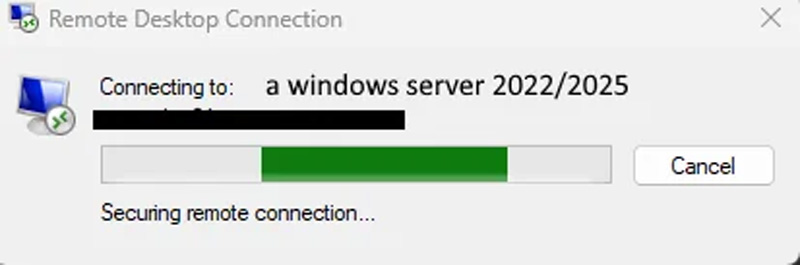
Existing sessions often fail to disconnect or log off cleanly, leaving ghost sessions that consume server resources. Concurrently, new connection attempts hang indefinitely during the authentication or session-initialization phase before eventually timing out. In severe instances, the entire RDP subsystem freezes, rendering administrative GUI tools unresponsive and forcing IT staff to perform ungraceful hard resets—risking data corruption and service disruption for active enterprise users.
Technical Analysis and Community Findings
While official diagnostic telemetry from Microsoft is pending, proactive system administrators and systems engineers have utilized debugging tools to isolate the root cause of the service hangs. Early community investigations point toward a debilitating process deadlock occurring between the Remote Desktop Services stack and the operating system’s Local Session Manager (LSM).
Deep-dive debugging sessions shared on technical forums indicate that the Remote Desktop service hangs specifically within the internal function call RDPSERVERBASE!WDLIB_Close. Analysts noted an apparent absence of an explicit timeout mechanism within this routine. When a user attempts to log out or terminate a session, the lack of a proper timeout handling procedure causes the thread to hang indefinitely, resulting in a system-wide resource deadlock. Because the LSM and RDP components become mutually dependent yet locked, the service ceases to process any subsequent requests, blocking all further user logins and administrative remote management sessions.
For many organizations, standard service recycling or remote management commands fail to clear the hung processes. Standard administrative interventions, such as restarting the Remote Desktop Configuration service or resetting user sessions via command-line utilities, frequently return timeout errors or fail to execute entirely.
Chronology of the September 2026 Patch Tuesday Rollout
The crisis began unfolding immediately following Microsoft’s scheduled Patch Tuesday release for September 2026. The monthly compilation package was designed to address a substantial slate of vulnerabilities across the Windows ecosystem, including 966 distinct security flaws and two actively exploited zero-day vulnerabilities.
As enterprises rushed to secure their network perimeters against these documented threats, automated patching solutions and manual deployment rings pushed the cumulative updates to production servers. Within hours of deployment, administrators began noting anomalies. By the end of the first 24 operational hours, forum boards were flooded with corroborating reports.
Chronologically, the failure sequence typically adheres to the following phases:
- Deployment Phase: Administrators install the respective cumulative updates (KB5122876, KB5122882, or KB5122871) and reboot the servers as required.
- Grace Period: The server functions normally for a duration ranging from two to several hours, handling initial user logins and standard session operations.
- Trigger Event: The first wave of user logouts or session disconnections occurs, initiating the faulty closure sequence within the RDP subsystem.
- Service Degradation and Deadlock: The
RDPSERVERBASE!WDLIB_Closedeadlock takes effect. Active sessions freeze, and subsequent connection attempts hang indefinitely. - Critical Failure: Management capabilities via Remote Desktop are lost, compelling administrators to execute physical or hypervisor-level hard resets.
Mitigation Strategies and Operational Dilemmas
Faced with mounting user complaints and productivity losses, administrators have scrambled to implement effective workarounds. Empirical evidence gathered from enterprise environments indicates that standard service restarts are largely ineffective once the deadlock has manifested.
Currently, the only verified and reliable remediation strategy is rolling back the problematic September 2026 cumulative updates. System administrators who have uninstalled the patches report an immediate restoration of normal Remote Desktop Services functionality, allowing users to log in, work, and log out without service interruptions.
However, this workaround introduces a severe security dilemma. By rolling back the updates, organizations eliminate the newly patched vulnerabilities—including the two critical zero-day flaws addressed in the September release. Administrators are thus forced into an unenviable operational trade-off: choose between maintaining network security at the expense of remote workforce productivity, or preserve business operations by exposing infrastructure to potential cyber threats.
Industry Implications and Broader Context
The recurrence of disruptive cumulative updates highlights ongoing challenges within Microsoft’s software validation and quality assurance pipelines for enterprise server operating systems. Windows Server environments demand exceptionally high levels of reliability, where unexpected service deadlocks can paralyze entire business operations, particularly in organizations utilizing Virtual Desktop Infrastructure (VDI) or centralized session host farms.
This incident also underscores the growing complexity of maintaining legacy and modern subsystems within unified cumulative update packages. As operating systems evolve to support hybrid cloud architectures and advanced security baselines, legacy components such as Remote Desktop Services and Local Session Manager remain tightly coupled with core OS networking and authentication stacks. A regression in one component can cascade rapidly through the enterprise architecture.
Official Response and Outlook
At the time of publication, Microsoft has not officially acknowledged the Remote Desktop Services failures associated with the September 2026 cumulative updates, nor has the company released an out-of-band patch or official advisory regarding the reported deadlocks. Industry observers and affected IT professionals await an official statement or a revised quality update that addresses the underlying race conditions and deadlock vulnerabilities within the RDP stack without sacrificing critical security patches.
As enterprises continue to navigate the aftermath of the September Patch Tuesday deployment, monitoring community-driven channels and maintaining rigorous pre-deployment testing protocols in isolated staging environments have emerged as vital practices for mitigating unforeseen update regressions.