Nb2lite-skill-claude: Revolutionizing AI Image Generation with Stateful Claude Code Integration

The landscape of artificial intelligence-powered image generation is undergoing a significant transformation with the introduction of nb2lite-skill-claude, a novel integration that brings stateful image editing capabilities to Claude Code. This groundbreaking project leverages Google’s gemini-3.1-flash-lite-image model, wrapping it in a lightweight FastMCP server and packaging it as a Claude Code skill. The result is a seamless workflow where users can iteratively refine generated images through simple conversational prompts, maintaining visual context across multiple turns. This article delves into the technical underpinnings, practical applications, and broader implications of this innovative tool.
The Stateless Struggle: A Legacy of Image Generation Limitations
Historically, most AI image generation tools have operated under a stateless paradigm. Users submit a text prompt, the model processes it to produce an image, and then immediately discards all contextual information about that generation. This fundamental limitation poses a significant challenge for iterative refinement. If a user wishes to modify a generated image – for instance, changing a detail in the background or altering a character’s expression – they are typically forced to re-describe the entire scene. This often leads to undesirable outcomes, as the model struggles to retain the original composition, lighting, and character integrity, resulting in a "round trip" of modifications that compromises the initial artistic vision. This persistent issue has been a major bottleneck for creative professionals and hobbyists alike, demanding more intuitive and persistent methods for image manipulation.
Gemini 3.1 Lite: A Stateful Leap Forward
Google’s gemini-3.1-flash-lite-image model, affectionately nicknamed "Nano Banana 2 Lite," represents a departure from this conventional approach. This high-efficiency image model is engineered for rapid generation, capable of producing images in under two seconds. A key feature of this model is its robust text rendering capabilities, supporting over 25 languages. Crucially, however, it incorporates support for the Stateful Interactions API. This API allows for multi-turn image refinement, where the model actively preserves the visual context server-side. This stateful memory enables users to issue subsequent prompts that build upon previous generations, rather than starting from scratch. This marks a significant advancement, moving image generation from a discrete, one-off event to a dynamic, conversational process.
nb2lite-skill-claude: Bridging the Gap
The nb2lite-skill-claude project effectively bridges the gap between Google’s advanced stateful image generation model and the interactive environment of Claude Code. This integration allows Claude Code, a powerful coding agent, to harness the Gemini model’s capabilities directly within its conversational interface. Users can interact with Claude Code by typing natural language commands, such as "generate an image of a cyberpunk kitchen." The agent then translates these commands into requests for the Gemini model, returning the generated image. The true power of this integration lies in its iterative nature: a subsequent command like "add a neon RAMEN sign" directly modifies the same image, without requiring the user to re-describe the entire scene. This stateful editing capability drastically simplifies and enhances the creative workflow, making complex image adjustments as easy as a follow-up instruction.
The project is delivered as a cohesive package, combining the technical infrastructure for stateful image generation with the user-friendly interface of a Claude Code skill. This dual nature ensures that both the underlying technology and the user experience are carefully considered.
The Interactions API: Images That Remember
At the heart of this innovation lies Gemini’s Interactions API, which facilitates stateful image generation. The core operational loop of this API involves a series of interactions where the model maintains a persistent state.
The Stateful Generation Loop:
- Initial Prompt: The user provides a prompt to generate an image.
- Model Processing: The Gemini model processes the prompt, creating an image and storing its context server-side.
- Output and Interaction ID: The model returns the generated image along with a unique interaction ID. This ID acts as a key to recall the specific image’s state for future modifications.
- Iterative Refinement: For subsequent edits, the user provides a new prompt that describes only the desired change. This prompt is sent along with the previous interaction ID.
- Contextual Editing: The Gemini model uses the stored context associated with the interaction ID to apply the requested edit, ensuring continuity and coherence.
- Updated Output: The model returns the newly edited image, along with a new interaction ID for further refinements.
This mechanism starkly contrasts with the "stateless suffering" of traditional models. Instead of convoluted prompts like:
"A watercolor fox in a forest at dawn, mist, soft light, wearing a red scarf, three birch trees on the left, and now also holding a lantern."
Users can simply articulate their desired change:
"Add a lantern in its paw."
The underlying state maintained by the Interactions API ensures that the fox, forest, and other elements remain consistent. The server component of nb2lite-skill-claude transparently handles several practical aspects of this process:
- API Key Management: Securely manages the Gemini API key.
- Model Configuration: Configures the Gemini model for optimal image generation and editing.
- Output Management: Directs generated images to a specified local directory.
- Error Handling: Catches and translates API errors into human-readable messages for the Claude Code agent.
Model Context Protocol (MCP): Standardizing AI Tool Integration
The integration of such advanced AI models into conversational agents is made possible by the Model Context Protocol (MCP). MCP is an open standard designed to streamline the connection between AI assistants and various tools and data sources. Before MCP, integrating a new service with an AI assistant required bespoke code for each assistant-service pairing, leading to duplicated effort and complex plumbing. MCP simplifies this by establishing a universal interface: tool developers create a single MCP server that exposes typed tools, and any MCP-compliant client, such as Claude Code or Claude Desktop, can discover and utilize these tools without additional integration code.
An MCP server typically runs as a small, local process that communicates using JSON-RPC over standard input/output (stdio). The client launches the server, queries it for available tools, and then allows the AI model to invoke these tools as if they were native functions.
The nb2lite-agent server, which is part of this project, exposes four distinct tools:
| Tool | Description |
|---|---|
generate_image |
Generates a text-to-image output, up to 1k resolution. It saves the image locally and returns its path along with an interaction ID. |
edit_image |
Enables stateful image editing by taking a previous interaction ID and a prompt describing only the desired change. |
edit_local_image |
Allows for editing of existing local image files by uploading them inline (base64 encoded) and applying edits. This serves as an entry point for modifying pre-existing visuals. |
get_help |
Provides live configuration details, including API key status, the active model, output directory, and a full reference of available tools. |
Generated images are saved to disk with filenames prefixed by gen_, edit_, or edit_local_, followed by a timestamp and a unique UUID suffix (e.g., gen_1784759001_a1b2c3d4.jpg). This naming convention helps prevent overwrites during concurrent generations and ensures clear identification of edited files. Error messages are communicated as text strings, allowing the agent to interpret and react to them appropriately.
Claude Code Skills: Embedding Workflow Intelligence
While MCP provides the "hands" for Claude to interact with tools, a Claude Code skill provides the "muscle memory." A skill is essentially a markdown file (SKILL.md) bundled with necessary resources. When loaded into Claude’s context, it educates the AI on specific workflows, dictating which tools to use, in what sequence, and under what constraints.
For the nb2lite-image skill, this includes defining:
- Tool Mapping: How natural language requests are translated into specific MCP tool calls.
- Parameter Inference: Automatically extracting parameters like
aspect_ratiofrom user prompts. - State Management: Tracking the latest interaction ID for seamless sequential editing.
- Output Interpretation: Understanding the responses from the MCP server, including image paths and interaction IDs.
Crucially, the skill package is self-contained. It bundles the MCP server itself (mcp/server.py), its dependencies, an installation script, and even a copy of the Interactions API developer guide. This means that installing the skill provides users with everything they need to set up the MCP server and begin generating images.
Installation Pathways: Getting Started with Stateful Image Generation
Users can integrate nb2lite-skill-claude with minimal friction, requiring only Python 3.10+, Claude Code, and a Google Gemini API key obtained from Google AI Studio. Several installation paths are provided to cater to different user preferences:
Path A: The Plugin Marketplace
For the quickest setup, users can install the skill directly from the Claude Code plugin marketplace:
/plugin marketplace add xbill9/nb2lite-skill-claude
/plugin install nb2lite-image@nb2lite-skill-claude
This method installs the skill and automatically registers the MCP server. The plugin manifest itself does not store API keys, adhering to best security practices. The MCP server reads the GEMINI_API_KEY from the environment, so it must be exported before launching Claude Code.
Path B: Clone and Bootstrap
Alternatively, users can clone the repository and use a provided bootstrap script:
# 1. Get the code
git clone https://github.com/xbill9/nb2lite-skill-claude.git
cd nb2lite-skill-claude

# 2. One-command setup: installs dependencies, registers the MCP server in .mcp.json, and prompts for API key (stored in ~/gemini.key)
./init.sh

# 3. Restart Claude Code in this directory and approve the server when prompted. Verify with:
/mcp # Should list nb2lite-agent
The init.sh script automates dependency installation, MCP server registration, and prompts for the API key, storing it securely. Rerunning init.sh is safe if any issues arise.
Path C: Install into Your Project
For users who prefer to integrate the skill into an existing project:
make init TARGET=/path/to/your/project ARGS='--output-dir ./images'This command copies the skill into the specified project directory and updates the project’s .mcp.json file with the nb2lite-agent entry. It can leverage an existing ~/gemini.key file. After restarting Claude Code within that project and approving the server, the skill will be active.
Path D: Docker Integration
A Docker image, xbill9/nb2lite-agent, is available for users who prefer containerized environments:
claude mcp add nb2lite-agent --env GEMINI_API_KEY="$(cat ~/gemini.key)" --
  docker run --rm -i -e GEMINI_API_KEY -v "$PWD:$PWD" -w "$PWD" xbill9/nb2lite-agent
The volume mounts (-v "$PWD:$PWD" -w "$PWD") are crucial. They ensure the container can access the host’s filesystem for saving images and reading local files, maintaining consistency between the host and the container.
Troubleshooting and Support
A comprehensive troubleshooting guide is available within the project’s documentation, addressing common issues related to API key configuration, environment variables, and server registration. Community support channels are also provided for users seeking assistance.
Practical Examples: A Session in Action
The real power of nb2lite-skill-claude is evident in its practical application. A typical user session demonstrates the seamless iterative refinement:
User: "Generate a cozy cabin in a snowy forest at dusk, 16:9."
Claude Code translates this into an MCP call:
generate_image(
    prompt="A cozy log cabin in a snowy forest at dusk, warm light in the windows",
    aspect_ratio="16:9",
    thinking_level="low",
)
# 🖼️ Saved to: ./gen_1784759001_a1b2c3d4.jpg
# Interaction ID: v1_ChdpRU5...
The output includes the generated image path and a crucial interaction ID.
User: "Nice. Add smoke curling from the chimney."
Claude Code then uses the edit_image tool with the previous interaction ID:
edit_image(
    previous_interaction_id="v1_ChdpRU5...",
    edit_prompt="add gentle smoke curling from the chimney",
)
# 🖼️ Saved to: ./edit_1784759050_e5f6a7b8.jpg
# Interaction ID: v1_Xk9mPq2... (a NEW ID for the next edit)
The cabin, trees, and existing smoke remain, while new smoke is added. A new interaction ID is generated for subsequent modifications.
User: "Now make it night, with aurora in the sky."
This prompt would again use the edit_image tool, building upon the last state. The cabin, trees, and chimney smoke would remain, with only the sky transitioning to night and featuring an aurora. This illustrates the persistent context that eliminates the need for redundant descriptions.
Furthermore, the edit_local_image tool allows for the integration of pre-existing visuals:
User: "Take ./whiteboard-sketch.png and render it as a clean 3D product mockup."
This translates to:
edit_local_image(
    image_path="./whiteboard-sketch.png",
    edit_prompt="render this hand-drawn sketch as a high-fidelity 3D product mockup",
    aspect_ratio="4:3",
)
The tool uploads the local file and applies the requested transformation, returning an interaction ID for potential follow-up edits, thereby enabling stateful refinement of non-AI-generated images.
Dogfooding: Real-World Application and Validation
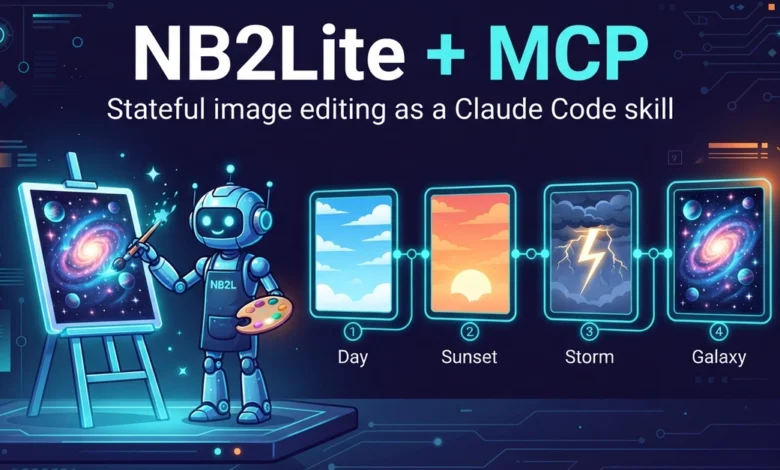
The principle of "dogfooding"—using one’s own product for real work—is central to the development and validation of nb2lite-skill-claude. The project rigorously applies this philosophy across its entire stack, most notably demonstrated by the cover image of this article. This image was generated using the very tool being described, serving as an immediate and tangible proof of its capabilities.
The prompt used for the cover image exemplifies the sophisticated control offered:
generate_image(
    prompt="A wide tech blog cover illustration: a friendly robot artist "
           "painting a glowing galaxy on an easel, while a chain of connected "
           "frames behind it shows the same picture evolving step by step "
           "(day sky, then sunset, then storm with lightning). Flat vector "
           "style, deep indigo background, neon cyan and orange accents. "
           "Title text 'NB2Lite + MCP', subtitle 'Stateful image editing "
           "as a Claude Code skill'. Crisp, accurate lettering.",
    aspect_ratio="16:9",
    thinking_level="high",
)
# 🖼️ Image successfully saved!
# ✅ Saved to: gen_1784759177_cbab8b65.jpg
# ✅ Interaction ID: v1_ChdpRU5hb2o3SWMzV2pNY1AtUFgy...
This exact output is committed to the repository as devto-cover.jpg, providing transparent evidence of the generation process.
Key aspects highlighted by this dogfooding approach include:
- Accurate Text Rendering: The model successfully rendered specific text elements ("NB2Lite + MCP," "Stateful image editing as a Claude Code skill") with precision, a common challenge for image generation models.
- Consistent Style: The requested "flat vector style" with specific color accents was consistently applied.
- Complex Composition: The intricate composition involving a robot, an easel, a galaxy, and a sequence of evolving frames was realized as intended.
- Iterative Refinement Simulation: The prompt itself describes an image that visualizes the iterative process, demonstrating the model’s understanding of abstract concepts related to its own functionality.
This commitment to dogfooding provides the cheapest form of credibility: the tool’s actual output is the first thing users see. If the lettering had been garbled or the layout flawed, the article itself would serve as evidence of those shortcomings. Instead, it acts as a direct, unedited demonstration of the skill’s efficacy.
Broader Impact and Future Implications
The nb2lite-skill-claude project signifies a pivotal shift in how AI can be integrated into creative workflows. By enabling stateful, conversational image generation and editing within a coding agent, it lowers the barrier to entry for complex visual tasks. This could have profound implications for various fields:
- Software Development: Developers can now generate and refine UI mockups, game assets, or visualizations directly within their coding environment, accelerating the design iteration process.
- Content Creation: Bloggers, marketers, and designers can create and modify visual content more efficiently, without extensive knowledge of specialized image editing software.
- Education: The intuitive, conversational interface can serve as a powerful educational tool for learning about AI image generation and prompt engineering.
- Accessibility: By simplifying complex tasks into natural language commands, the technology enhances accessibility for individuals who may not have traditional design skills.
The project’s reliance on open standards like MCP suggests a future where AI agents can seamlessly interact with a vast ecosystem of tools and services, fostering a more interconnected and powerful AI landscape. As models like Gemini continue to evolve, and as tools like Claude Code gain wider adoption, stateful AI interactions are poised to become the norm rather than the exception.
Conclusion
nb2lite-skill-claude represents a significant advancement in the field of AI-powered image generation. By effectively integrating Google’s stateful Gemini model with Claude Code via the MCP framework, it offers a powerful, intuitive, and efficient way to create and refine visual content. The project’s commitment to open standards, ease of installation, and rigorous dogfooding practices underscore its potential to transform creative workflows across numerous industries. As AI continues to permeate our digital lives, innovations like this pave the way for more seamless, intelligent, and accessible human-AI collaboration.
Links:
- nb2lite-skill-claude GitHub Repository: https://github.com/xbill9/nb2lite-skill-claude
- Google AI Studio: https://aistudio.google.com/
- Model Context Protocol (MCP) Documentation: (Link to be provided if available)
- Claude Code: (Link to be provided if available)
Disclaimer: This is a third-party community project, not affiliated with or endorsed by Anthropic or Google. Users are responsible for obtaining and managing their own Gemini API keys. Image generation incurs costs, and users are advised to use thinking_level="low" for drafting and thinking_level="high" for final outputs.