Empowering Android Developers: New CLI Tools, Cloud-Based Device Streaming, and AI Skill Integrations Redefine App Engineering

The landscape of mobile software development is experiencing a fundamental shift as artificial intelligence increasingly integrates into daily coding workflows. Recognizing that modern Android developers rely on a diverse mix of agents, large language models (LLMs), tools, and command-line interfaces (CLIs), platform maintainers are actively expanding their ecosystem support. By introducing major updates to the Android CLI, enabling secure remote access to physical hardware through Android Device Streaming, and expanding a specialized repository of environment-agnostic "Android skills," the tooling aims to elevate app quality regardless of an engineer’s preferred setup. These advancements bridge the historical gap between generalized AI training data and platform-specific development standards, offering a streamlined approach to building robust applications across mobile phones, tablets, and wearable devices.
At the core of this operational update is the enhanced Android CLI, a command-line interface tool engineered to optimize how developers and AI agents interact with the Android platform. Historically, developers faced fragmentation when attempting to unify disparate AI agents with native build systems, testing frameworks, and environment setups. The updated CLI addresses this friction by providing a standardized bridge. Equipped with the android-cli skill, AI agents can autonomously create, build, test, and manage complex Android projects. Furthermore, the tool assists in environment configuration, emulator orchestration, and automated test execution directly from the terminal.
A persistent challenge in automated testing and AI-driven development has been the limitation of software emulators, which occasionally fail to surface hardware- or OS-specific edge cases. To resolve this bottleneck, the updated Android CLI now incorporates Android Device Streaming, granting developers and their autonomous agents remote access to real physical devices. Operating over a secure ADB (Android Debug Bridge) via an SSL connection, the integration allows an AI agent to interface with physical hardware—such as the Pixel 10 Pro—as if the device were physically tethered via a USB cable. Through the terminal, agents can seamlessly spin up remote physical hardware, deploy builds, harvest diagnostic logs and performance traces, and capture headless screenshots. This capability transforms remote device farms into active components of automated continuous integration and local agentic debugging pipelines.
Complementing these command-line enhancements is the continuous expansion of the Android skills repository, designed to ground LLMs in official, up-to-date platform guidelines. Standard foundational models possess static training cutoffs that often lag behind modern architectural patterns, jetpack library updates, and deprecation schedules. Android skills solve this limitation by injecting structured instructions contained within standardized SKILL.md files directly into an agent’s working context. These files supply precise API references, current code samples, and authoritative architectural patterns sourced directly from official documentation. With over twenty specialized skills currently available, developers can equip tools like Claude, Codex, or custom environments to manage intricate development tasks without falling back on outdated paradigms. Moreover, these skills are designed to be entirely environment-agnostic, functioning seamlessly inside Android Studio, terminal-based workflows, or third-party IDEs.
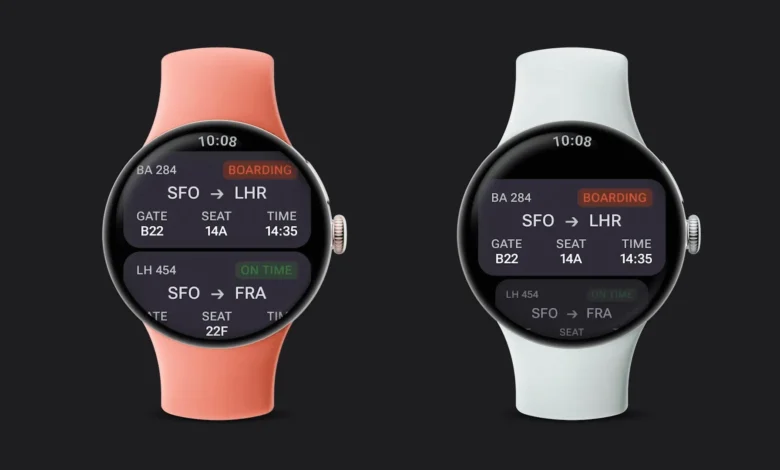
To understand the practical impact of these integrations, industry observers often point to specialized domains such as wearable technology. Developing applications for Wear OS demands strict adherence to unique user experience paradigms, including round viewports, rotary input mechanics, optimized power consumption profiles, and specialized layout containers like TransformingLazyColumn, AppScaffold, and ScreenScaffold. Historically, general-purpose LLMs frequently struggled to generate compliant Wear OS code, often relying on legacy mobile patterns that degraded user experience and drained battery life.
The introduction of the Wear Compose Material 3 skill (wear/wear-compose-m3) has directly mitigated these challenges. Early enterprise adopters have reported substantial productivity gains following its deployment. Notably, the engineering team at FotMob utilized the Wear Compose Material 3 skill to overhaul their existing Wear OS application. Their migration process involved converting multiple legacy lists to the performant TransformingLazyColumn, implementing ScreenScaffold content padding, updating list header titles, and integrating SurfaceTransformation elements across cards and buttons. According to the engineering team, the resulting codebase successfully compiled and passed all verification checks on emulators regarding smooth scrolling, rotary input response, edge morphing, and right-to-left (RTL) language support. Crucially, the migration allowed the development team to entirely eliminate custom legacy wrappers and verbose rotary boilerplate code. Roy Solberg, Android Tech Lead at FotMob, summarized the efficiency of the integration, noting that a single afternoon using the specialized skill resulted in eight migrated lists and the removal of extensive custom input code. Furthermore, engineers observed that the skill actively caught subtle logical errors that the underlying base model missed entirely, such as failing to propagate ScreenScaffold content padding into lists or defaulting to hardcoded typography values instead of theme-compliant scaling.
The introduction of these tools reflects a broader strategic pivot within the software engineering industry toward agentic workflows and rigorous tool grounding. By shifting away from static, model-dependent code generation and toward dynamic, context-aware instruction sets, platform providers are establishing a more reliable foundation for AI-assisted programming. The methodology relies heavily on rigorous evaluation frameworks, ensuring that every skill introduced to the repository is rigorously tested against deprecation cycles and changing API specifications.
For developers looking to integrate these capabilities into their current pipelines, the adoption process is streamlined. The Android CLI can be installed via a single command, after which running the android init utility configures the local development agent. Developers can subsequently explore the available skill catalog and integrate specific modules using the android skills add command. Detailed documentation regarding remote device streaming, command syntax, and release notes remains accessible through official developer portals, providing a clear roadmap for teams aiming to modernize their mobile and wearable engineering practices.