The landscape of cloud-native software development shifted significantly today with the official release of AWS Emulator, a powerful, open-source tool designed to run AWS service APIs directly on a developer’s local machine. This initiative marks a pivotal departure from traditional cloud-dependency in the development lifecycle, allowing engineers to write, test, and iterate on complex AWS-integrated applications without the need for constant connectivity to the AWS cloud or the associated costs of provisioning ephemeral infrastructure. Built in Rust to ensure high performance and minimal resource consumption, the emulator bridges the gap between local development environments and production-grade cloud services.
The Evolution of Local Development
For over a decade, developers have grappled with the "inner loop" problem: the delay associated with deploying code to a remote environment to verify that interactions with cloud services, such as Amazon DynamoDB, Amazon S3, or Amazon SQS, function as intended. While various third-party community projects have attempted to mimic AWS behavior, these often lagged behind the rapid pace of AWS feature releases.
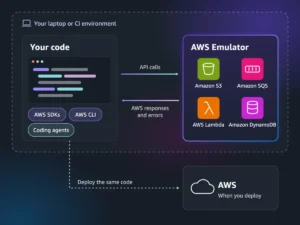
AWS Emulator changes this paradigm by being directly derived from the same AWS API models that power the AWS SDKs. By utilizing these foundational models, the emulator ensures that API requests, response shapes, and error structures remain consistent with what developers encounter in the live AWS environment. The project is open-source and hosted on GitHub, inviting transparency and community collaboration on its ongoing development.
Technical Architecture and Operational Mechanics
The AWS Emulator is designed for seamless integration into existing developer workflows. Upon initialization, the tool generates a localized security environment, creating unique credentials, configuration files, and SSL certificates stored within a dedicated directory on the host machine. By setting specific environment variables—such as AWS_ENDPOINT_URL and AWS_SHARED_CREDENTIALS_FILE—developers can redirect their AWS CLI commands and SDK calls from the global cloud endpoints to the local 127.0.0.1:9297 address.
For Linux-based environments, the emulator is distributed via standard RPM and Debian packages, allowing for straightforward installation via common package managers. For users on macOS and Windows, the tool is packaged within a Docker container, ensuring consistent behavior across diverse operating systems. A notable feature is the "embedded mode," specifically designed for the AWS SDK for Rust. This mode allows the emulator to run directly within the process memory of a test suite, enabling high-concurrency testing where each test instance maintains its own isolated state. This architecture eliminates the overhead of network calls during unit and integration testing, drastically reducing the time required for CI/CD pipelines to complete.
Fidelity: The Gold Standard for Emulation
A critical challenge for any emulation tool is fidelity—the degree to which the emulator accurately mirrors the behavior of the actual service. To address this, the AWS team has implemented a robust "fidelity test" framework. These tests are short, programmatic workflows that execute specific operations, such as object storage in S3 or record manipulation in DynamoDB, against both the emulator and real AWS services.
The emulator is only considered successful if it matches the real-world AWS response in every metric: status codes, body content, and specific error messaging. To maintain transparency, AWS publishes a "k of n" score for each service, representing the ratio of passing fidelity tests. This scoring system provides developers with a clear snapshot of the emulator’s current capabilities. If an operation is not yet supported, the emulator returns a 501 (Not Implemented) status, providing an immediate fail-fast mechanism that prevents developers from unknowingly relying on incomplete functionality.
AI-Driven Maintenance and Security
One of the most innovative aspects of the AWS Emulator is its reliance on autonomous agent-based maintenance. The system is managed by specialized agents that utilize Amazon Bedrock AgentCore and AWS CodePipeline. These agents monitor the official Smithy API models, identify discrepancies between the emulator’s implementation and the official specifications, and automatically draft code updates to resolve those gaps.
This agentic loop extends to security, where an independent "adversarial" security agent reviews all proposed changes. This dual-layered approach—one agent building the features and another auditing them—ensures that the emulator remains secure and compliant with the high standards expected of AWS-branded software. However, the company emphasizes that the tool is not a security sandbox. Because the emulator does not perform full IAM policy evaluations or resource-based policy checks, developers are cautioned against using it to test production-level security configurations.
Broader Implications for the Cloud Industry
The release of AWS Emulator is expected to have a profound impact on the efficiency of software teams. By enabling developers to iterate on complex infrastructure-as-code scripts or coding agent tasks (such as those using Claude Code or Kiro) without incurring "wait times" for cloud deployments, the tool drastically reduces the friction of the development lifecycle.
Industry analysts suggest that this move is a direct response to the increasing complexity of cloud-native architectures. As systems become more distributed, the ability to test interactions locally becomes not just a convenience, but a necessity for scaling development velocity. By removing the cost barrier—as the emulator is free to use, with charges only applying when resources are eventually deployed to the real AWS cloud—the tool lowers the barrier to entry for smaller startups and individual developers.
Chronology and Future Roadmap
The development of the emulator has been a multi-year project, culminating in today’s general availability. The project’s presence on GitHub suggests an aggressive roadmap, with future updates expected to cover a wider range of AWS services and deeper integration into popular IDEs and CI/CD runners.
Developers are encouraged to check the AWS Capabilities by Region page to stay informed about service availability and to utilize the AWS MCP (Model Context Protocol) Server for troubleshooting and documentation queries. As the project evolves, the community expects to see improved support for cross-account and cross-region simulations, which remain the most significant current limitations.
A New Era of Localized Cloud Control
The introduction of the AWS Emulator signals a maturity in the cloud computing market. By providing a high-fidelity local replica of its services, AWS is acknowledging that the future of cloud development is hybrid—utilizing the power of the cloud for production, while leveraging the speed and isolation of the local machine for the creative and testing phases of development.
For organizations struggling with the latency and cost of cloud-based integration testing, the AWS Emulator offers a viable, performant, and reliable alternative. As the tooling matures and the fidelity scores continue to rise, the emulator is poised to become a standard component in the modern developer’s toolkit, potentially setting a new benchmark for how cloud providers support the local development experience. For now, the focus remains on ensuring that the community can contribute effectively, utilizing the publicly available fidelity test suites to push the emulator toward total parity with the AWS cloud.