Android Studio Expands AI Capabilities with New Bring Your Own Agent Framework Supporting Claude, Codex, and Antigravity

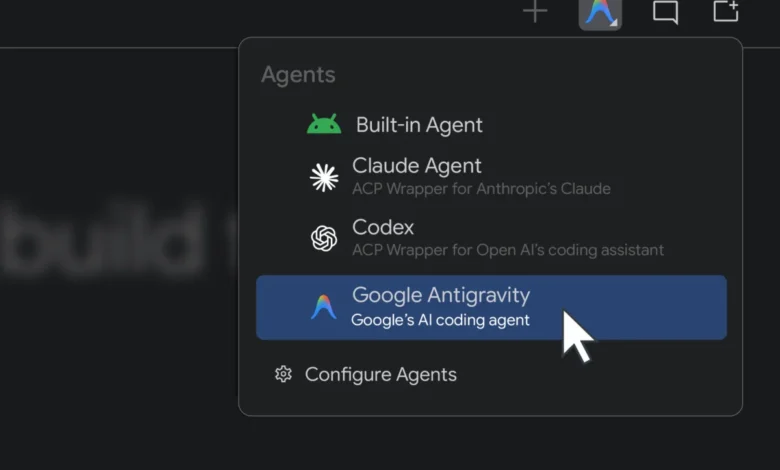
The landscape of mobile application development is undergoing a profound structural shift as integrated development environments increasingly incorporate autonomous artificial intelligence to accelerate engineering workflows. Google has announced a major architectural update to Android Studio, its official integrated development environment for the Android platform, introducing a feature known as Bring Your Own Agent, or BYOA. This capability fundamentally breaks down proprietary barriers within the IDE, allowing software engineering teams to integrate third-party and custom coding agents directly into their local development and testing environments.
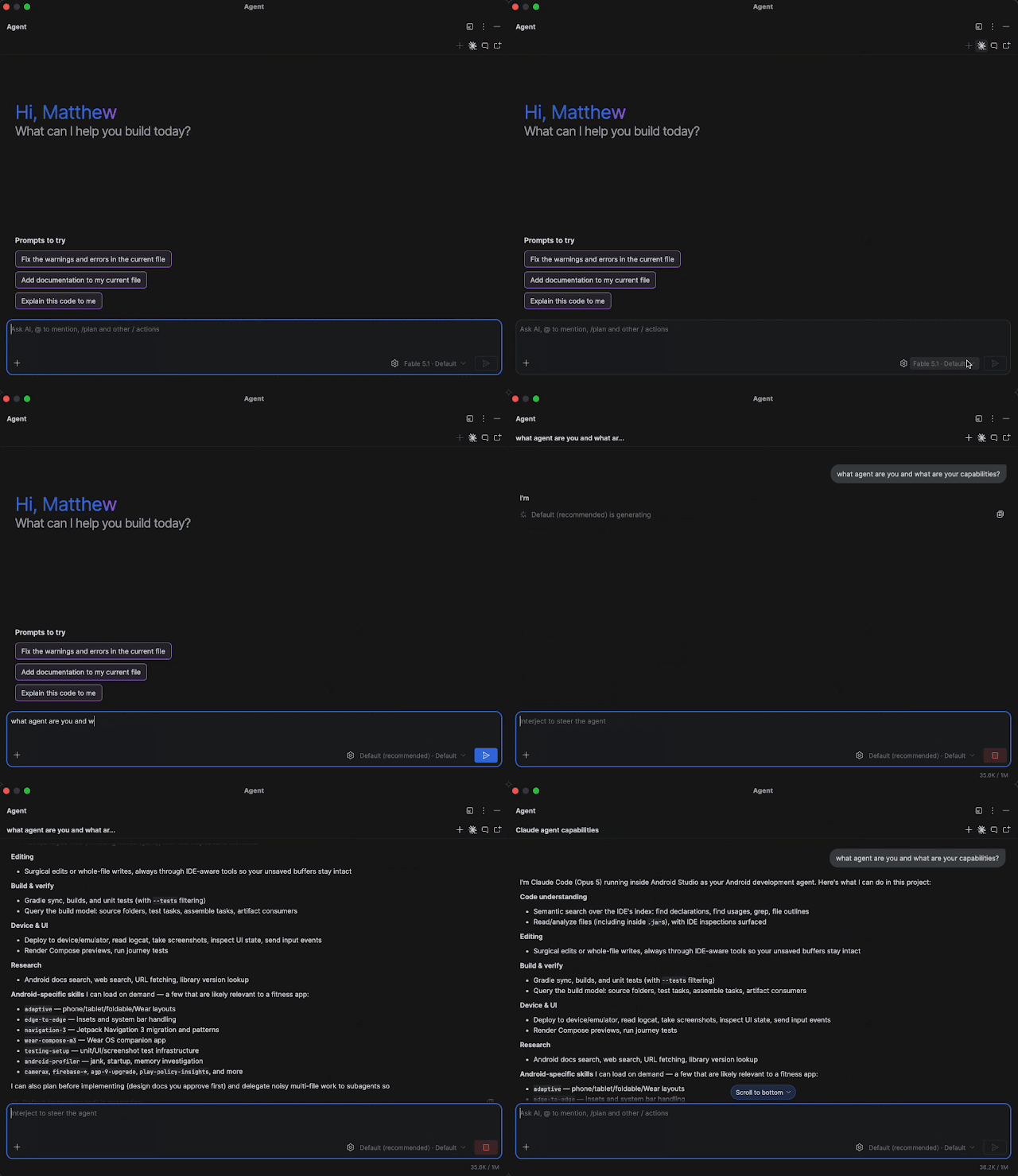
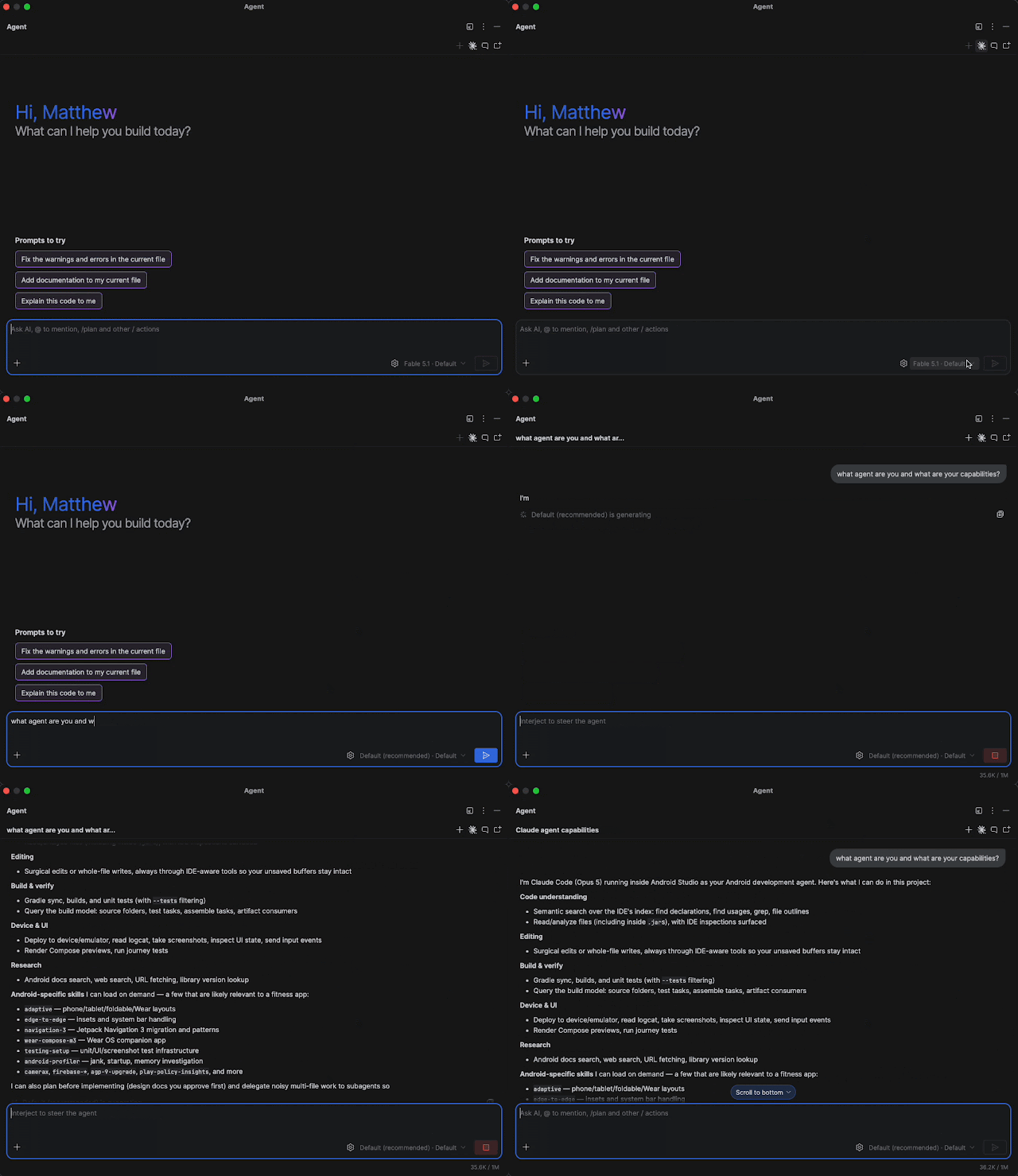
The new feature, rolling out initially within the Android Studio Canary preview release alongside the introduction of Android Studio Rabbit 2, supports prominent industry models and platforms. Developers can now seamlessly plug in Anthropic’s Claude Agent, OpenAI’s Codex, and Google’s newly unveiled Google Antigravity framework. By combining these advanced external language models and agents with Android Studio’s specialized, AI-optimized infrastructure, Google aims to deliver faster, highly accurate, and deeply contextualized code generation and execution.
Background Context and Evolution of AI in Android Development
The integration of artificial intelligence into software development tools has accelerated rapidly over the past three years. Initially, AI tools functioned primarily as sophisticated autocomplete engines, predicting lines of code based on immediate syntax and localized file context. However, the paradigm has shifted decisively toward agentic workflows—systems capable of planning, reasoning, and executing multi-step technical tasks across entire repositories without constant human intervention.

Last year, the Android Studio team took its first major step toward an open AI ecosystem by allowing developers to connect arbitrary remote AI models to the IDE. This flexibility acknowledged a fundamental reality of the modern software engineering market: enterprises and individual developers rarely rely on a single technology stack or AI provider. Different teams prefer different foundational models based on cost, speed, reasoning benchmarks, and organizational data governance policies.
The introduction of BYOA represents the logical evolution of this strategy. Rather than forcing developers to adapt their workflows to a single embedded assistant, Google is positioning Android Studio as an open platform capable of hosting whatever AI engine a development organization trusts most. This open-architecture approach mirrors broader industry trends toward interoperability, preventing vendor lock-in while maintaining the deep integration necessary for complex mobile application development.
Chronology and Phased Rollout of the BYOA Framework
The rollout of the Bring Your Own Agent framework follows a carefully structured release timeline designed to gather early feedback from the developer community before a stable public deployment:
- Initial Exploration: Google laid the technical groundwork by opening Android Studio to generic remote AI models, establishing secure communication protocols between the IDE and external APIs.
- Preview Phase Launch: The official debut of BYOA occurs in the Android Studio Canary channel, featuring initial out-of-the-box compatibility with Google Antigravity, Claude Agent, and Codex.
- Enterprise Integration Testing: Enterprise software development teams begin evaluating how external agents interact with proprietary codebases while maintaining corporate compliance and data privacy standards under frameworks like Gemini Enterprise.
- Broad Community Feedback and Benchmarking: Google correlates IDE performance data with evaluations from its Android Bench initiative, measuring how long-horizon tasks and multi-file code modifications perform under the new framework.
Capabilities and Technical Mechanics of Coding Agents in Android Studio

Modern coding agents operating within the Android Studio environment transcend traditional code completion by executing complete technical workflows. These capabilities are designed to handle complex, multi-layered engineering challenges that typically consume significant manual development time.
When an agent is integrated via the BYOA framework, it does not operate in a vacuum. It gains direct access to Android-specific skills and the comprehensive Android Knowledge Base. This foundational context ensures that code generated by models like Claude Agent or OpenAI Codex adheres strictly to contemporary Android best practices, modern Jetpack Compose architectures, Gradle build configurations, and asynchronous programming standards using Kotlin coroutines.
Furthermore, these agents can plan and execute comprehensive technical workflows directly within the local developer environment. Typical use cases include generating entire feature modules, orchestrating complex refactoring operations across legacy codebases, diagnosing and resolving obscure compilation errors, and writing comprehensive unit and UI test suites. By pairing external agents with IDE-native intelligence, the system achieves lower latency, higher contextual accuracy, and optimized token usage, translating to tangible cost savings for development teams.
Google Antigravity and the Gemini Ecosystem
While BYOA introduces robust support for third-party ecosystems, Google continues to invest heavily in its native infrastructure through Gemini and the newly introduced Google Antigravity platform. Developers who prefer to utilize Google’s models within Android Studio are encouraged to adopt the Google Antigravity agent.

Selecting Google Antigravity provides direct access to state-of-the-art models, including Gemini Flash 3.8, while unlocking increased AI usage quotas. Developers can authenticate the Antigravity agent using existing Google AI Pro or Ultra consumer subscription plans to seamlessly transfer their benefits directly into the IDE environment. Alternatively, enterprise and professional developers can opt for pay-per-token billing structures utilizing a standard Gemini API key.
For organizations operating under strict corporate governance, the integration maintains enterprise-grade security guarantees. Teams utilizing Gemini Enterprise can deploy either the built-in assistant or the Antigravity agent with full confidence that their proprietary source code remains protected under Google Cloud’s stringent data privacy and compliance frameworks.
Analysis of Industry Implications and Broader Impact
The introduction of an open agent registry within a dominant mobile IDE carries significant implications for the software tooling industry. By officially sanctioning competitors such as Anthropic and OpenAI inside its proprietary development environment, Google is acknowledging that the future of developer tooling lies in open ecosystems rather than closed silos.
For enterprise software buyers, this flexibility eliminates a major friction point. Many large financial institutions, healthcare providers, and technology firms maintain strict multi-cloud and multi-vendor policies. An enterprise that standardizes on Anthropic models for backend services can now maintain architectural consistency by deploying Claude Agent directly into the mobile development workflow without sacrificing IDE-level tooling optimization.

At the same time, this move raises the competitive stakes for code quality and benchmark performance. Initiatives like Android Bench—which evaluates long-horizon tasks and complex multi-file reasoning—will increasingly serve as public scorecards for how effectively different AI providers can assist mobile engineers. As agents become more autonomous, the competitive differentiator will shift from simple code generation to error recovery, context window management, and adherence to platform-specific idioms.
Getting Started and Implementation Steps
Developers interested in exploring the new Bring Your Own Agent framework can begin testing the capabilities immediately by downloading the relevant Canary release of Android Studio. Because support is rolling out in preview, users are advised to test agent integrations on non-production branches or experimental repositories to evaluate performance and workflow compatibility.
To connect a preferred coding agent within Android Studio, engineers should navigate the updated settings registry under the AI configuration panel, select the desired agent provider from the available list—such as Google Antigravity, Claude Agent, or Codex—and authenticate using the appropriate credentials, API keys, or subscription-linked account.
Google has emphasized that community feedback will play a critical role in refining the agentic experience prior to a general stable release. Developers encountering bugs, performance latency, or integration hurdles are encouraged to submit detailed bug reports through the official Android developer feedback portal. As these autonomous tools mature, the engineering community stands on the precipice of a fundamentally more flexible, powerful, and collaborative era in mobile application development.