Android Studio Rabbit 2 Officially Released with Bring Your Own Agent Support and Advanced XR Emulators

Google has officially announced the stable release of Android Studio Rabbit 2, marking a significant milestone in the evolution of Android application development tooling. Tailored specifically for production environments, this latest iteration introduces a suite of advanced features designed to streamline complex workflows, enhance artificial intelligence integration, and expand support for immersive technologies. Among the headline additions are the Bring Your Own Agent (BYOA) framework, robust Android Extended Reality (XR) emulators, an integrated agent skills manager, and sophisticated AI-driven code review mechanisms. The announcement coincides with the live-streaming of the annual Android Dev Summit, where developers are being given comprehensive demonstrations of the new toolset.
The launch of Android Studio Rabbit 2 comes at a time when the software development industry is undergoing a rapid transition toward AI-assisted engineering. Over the past several years, integrated development environments (IDEs) have shifted from passive code editors into active, collaborative environments. Google’s strategy with Rabbit 2 reflects a growing industry demand for developer choice, moving away from rigid, closed ecosystems and toward modular, interoperable platforms. By opening up the IDE to third-party coding agents and deep enterprise governance controls, Google aims to address the diverse infrastructural needs of individual contractors and massive engineering organizations alike.

Bring Your Own Agent (BYOA) and Ecosystem Flexibility
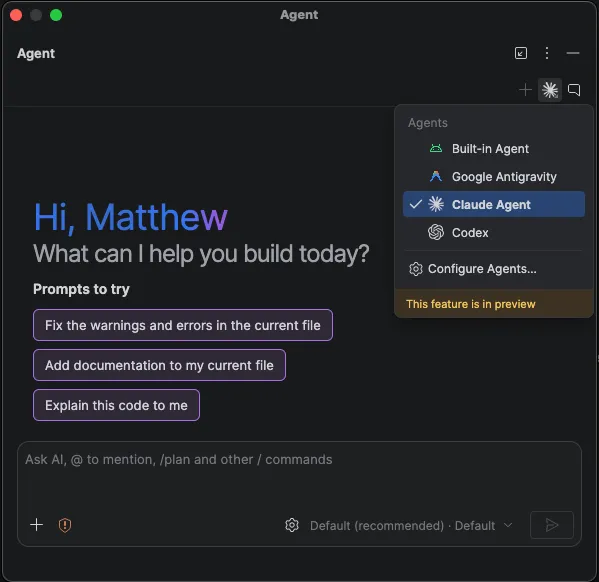
One of the most consequential architectural changes in Android Studio Rabbit 2 is the introduction of Bring Your Own Agent (BYOA). Recognizing that different projects require different optimization strategies regarding cost, speed, and capability, Google has designed the IDE to accommodate a wide variety of Agent Client Protocol (ACP) compliant coding agents. Developers are no longer restricted to a single proprietary AI model; instead, they can choose from an ecosystem of over forty distinct coding agents.
Supported options within the new framework include established solutions such as Claude Agent, OpenAI’s Codex, Junie, and Google Antigravity. These integrated agents are granted deep access to native Android Studio utilities, including the Android Emulator, underlying build systems, and Logcat diagnostics. Furthermore, they can leverage specialized Android skills to autonomously navigate and execute complex refactoring or implementation tasks.
Configuring BYOA is streamlined for developer efficiency. Users can select their preferred agent directly through the dedicated agent window interface or navigate through the global settings menu under Settings, Tools, AI, and Agents. Once authenticated, engineers can immediately begin submitting natural language prompts tailored to their specific project requirements.
Expanded Android XR Emulators for Immersive Computing
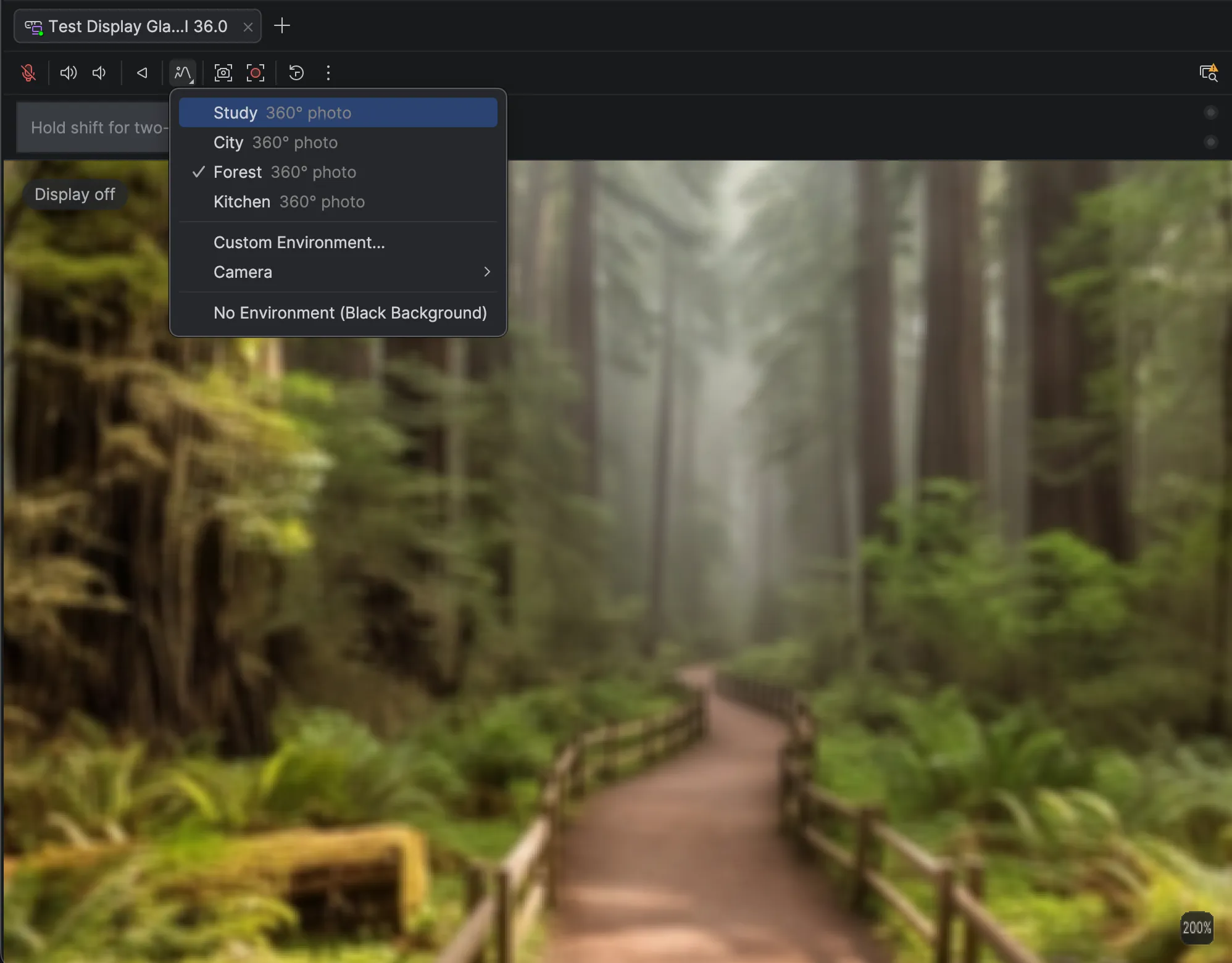
As extended reality hardware becomes increasingly prevalent, Google has transitioned its Android XR Emulators out of the preview channel, making them fully stable for production use within Android Studio Rabbit 2. The upgraded toolset allows developers to build, iterate, and test comprehensive XR experiences—spanning specialized XR glasses, audio glasses, and visual display glasses—directly from standard laptop hardware.
The updated display glasses emulator introduces advanced environmental customization features. Developers can now map custom 360-degree panoramic photos or live video feeds from connected cameras directly into the virtual environment. This capability enables rigorous testing of real-world physical lighting conditions, spatial layouts, and user interface responsiveness from any remote location.
To enhance hardware simulation accuracy, Google has also incorporated physical LED status indicators within the emulator interface to reflect microphone and camera operational states visually. Additionally, improvements to the automated Pairing Wizard ensure that virtual smartphones can connect to virtual audio and display glasses with significantly higher reliability and speed. These tools are accessible directly through the Android Studio Device Manager.
Advanced Skill Management and LeakCanary Integration
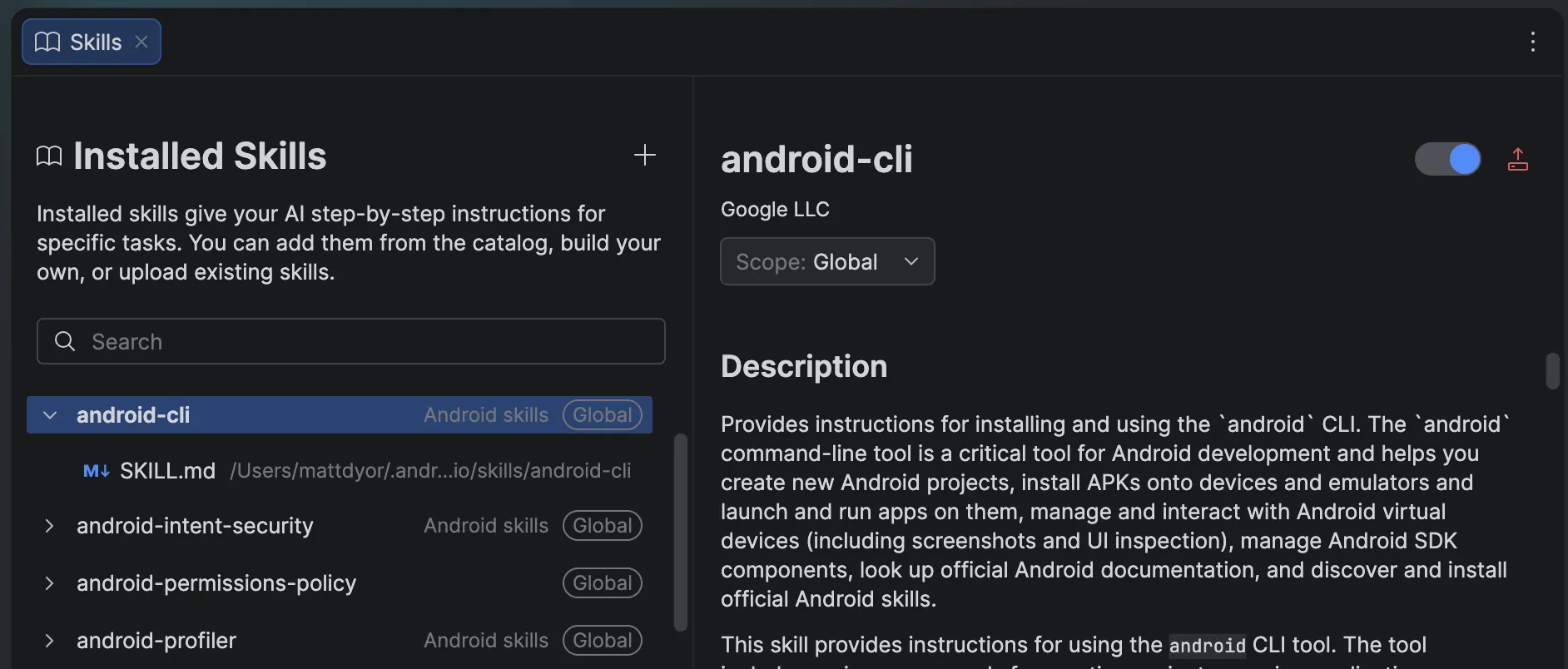
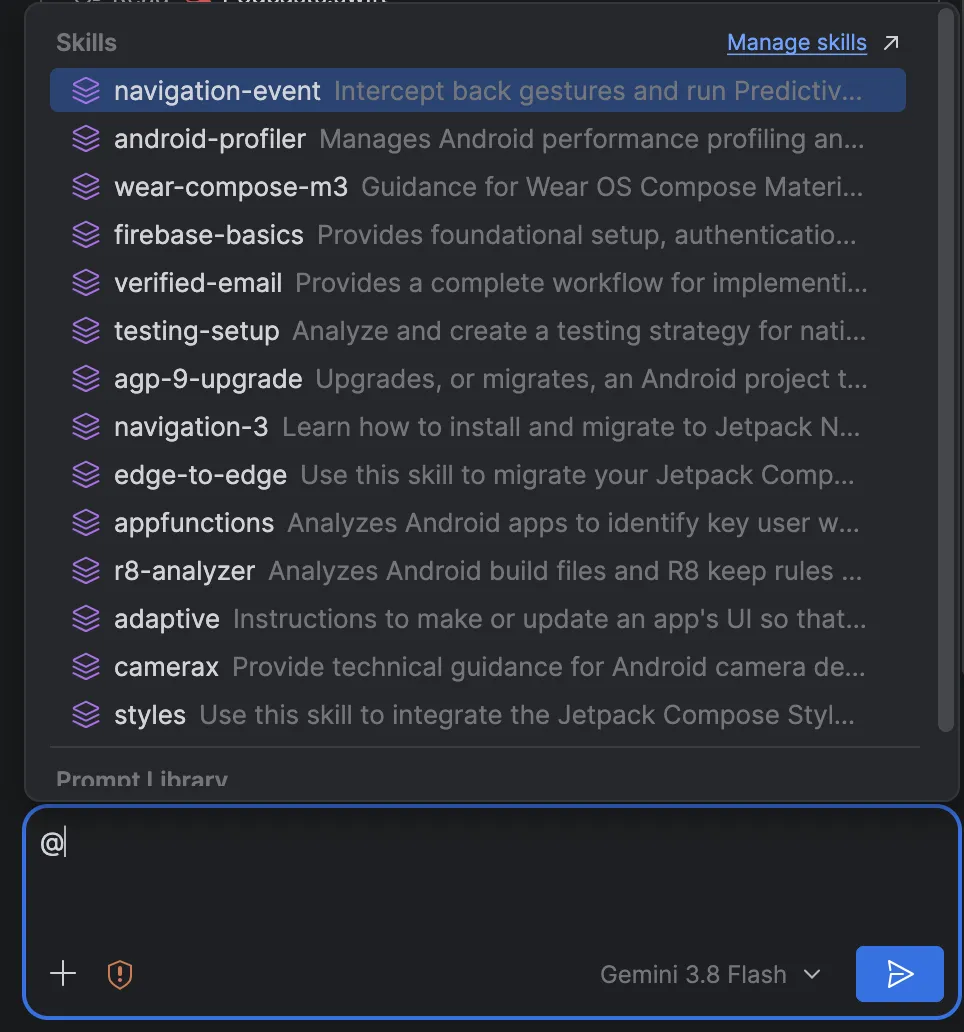
Managing agentic workflows has also been simplified through the introduction of a centralized Android skills manager. Accessible via the agent panel, chat box shortcuts, or the settings menu, the skills manager provides granular oversight over the procedural guidance and specialized workflows available to AI assistants.
Android Studio Rabbit 2 ships pre-loaded with an extensive library of native Android skills and Firebase agent skills. These include automated routines for migrating legacy XML layouts to modern Jetpack Compose, upgrading projects to Android Gradle Plugin (AGP) 9, implementing adaptive user interfaces designed for foldables and large tablets, and integrating complex components such as CameraX or Firebase cloud services.
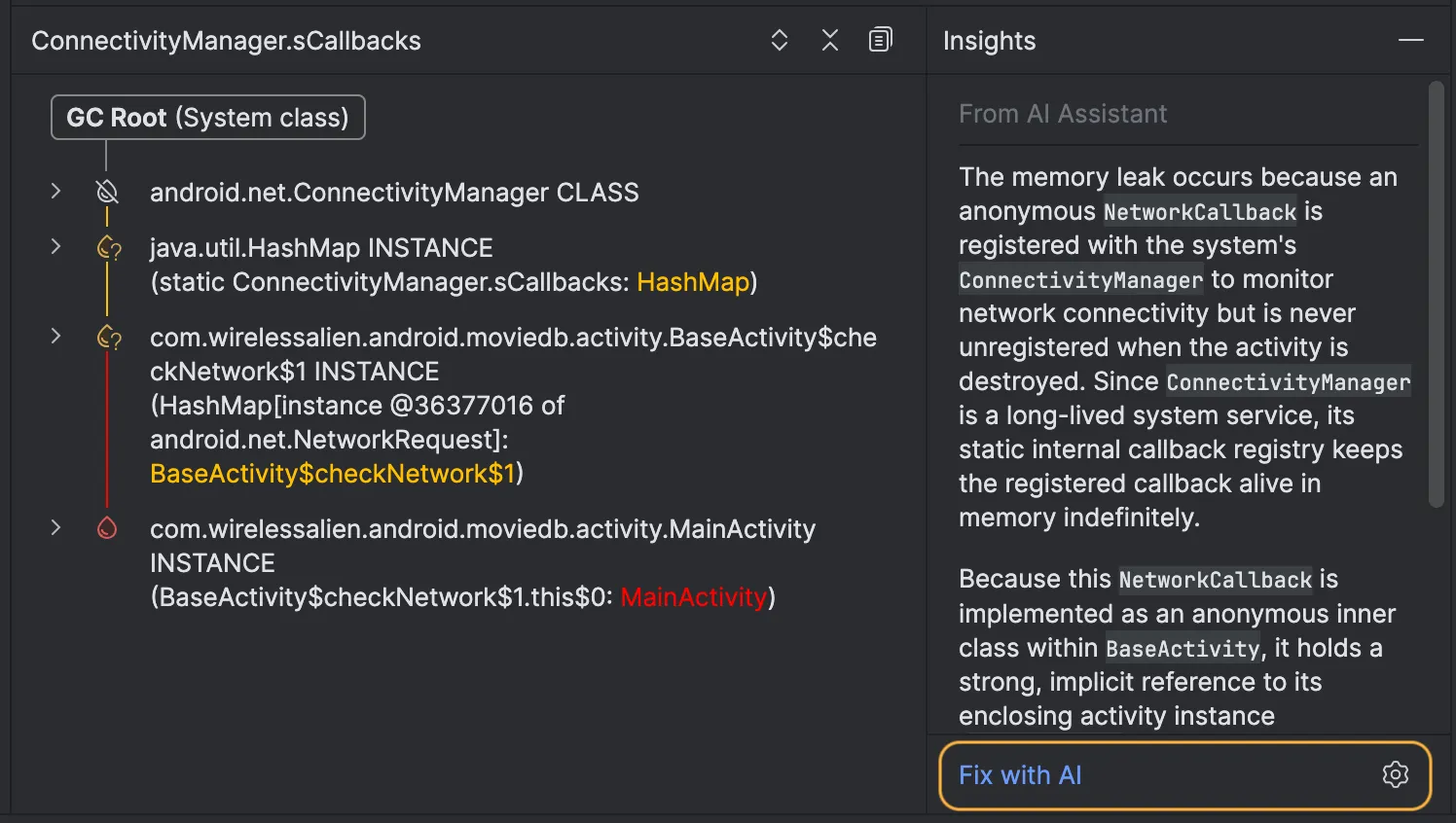
In tandem with skill management, Android Studio Rabbit 2 features a direct integration of LeakCanary within the built-in Profiler tool. Memory leaks have historically been among the most persistent and difficult bugs to diagnose in mobile application development. By combining LeakCanary’s detection algorithms with the IDE’s native AI capabilities, the system can now generate narrative-driven explanations outlining the root causes of memory leaks. More importantly, the agent can suggest and implement specific, targeted code modifications to resolve the memory retention issues without requiring the developer to leave the debugging environment.
Enterprise Governance and Guided Change Reviews
Addressing the rigorous security, privacy, and architectural demands of large corporate engineering departments, Android Studio Rabbit 2 continues to build upon the enterprise-grade governance frameworks introduced in earlier iterations. Gemini Enterprise support allows organizations to securely connect the IDE’s AI capabilities to internal design systems, proprietary SDKs, and private code repositories. This ensures that generated code and technical recommendations remain contextually relevant to a company’s internal standards.
A notable byproduct of increased reliance on AI-generated code is the emergence of review bottlenecks. When autonomous agents can generate or refactor thousands of lines of code in minutes, human verification becomes the primary limiting factor in software delivery pipelines. To mitigate this challenge, Google has introduced AI Change Review.
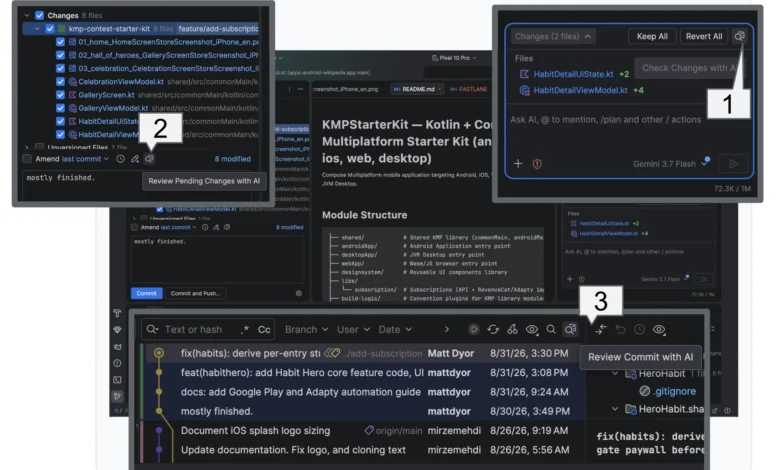
Change Review operates across multiple visual entry points within the IDE, including active agent modifications, pending local commits, and the historical Git log. The system initiates the process by surfacing recommended fixes derived from automated analysis. Once these preliminary issues are resolved, developers can activate the Create Walkthrough feature. Rather than forcing engineers to read raw diff files sequentially or alphabetically, the guided walkthrough groups and prioritizes related code modifications across the entire project into logical thematic units, significantly accelerating code review cycles.
Industry Implications and Future Outlook
The release of Android Studio Rabbit 2 underscores a broader macroeconomic shift in software engineering, where artificial intelligence is no longer treated as a novelty or an experimental plugin, but as foundational infrastructure. Industry analysts note that by decoupling the IDE from a single AI vendor through the BYOA model, Google is proactively mitigating vendor lock-in concerns while positioning Android Studio as a versatile hub for multi-agent software development.
The integration of spatial computing tools via the XR emulators also signals continued long-term investment in augmented and virtual reality platforms, providing developers with affordable local testing grounds ahead of broader consumer adoption cycles. Meanwhile, enterprise-focused updates indicate a concerted effort to capture market share among enterprise development teams that have previously hesitated to adopt AI coding assistants due to data privacy and intellectual property compliance concerns.
Getting Started and Community Engagement
Android Studio Rabbit 2 is available immediately as a stable download through the official Android developer portal. Google encourages developers encountering bugs or technical anomalies to submit detailed reports through the dedicated issue-tracking system.
Comprehensive technical sessions, architectural deep dives, and live demonstrations regarding the new feature set are currently being broadcast as part of the ongoing Android Dev Summit. Developers seeking further educational materials can review official documentation updates published concurrently on the Android Developers blog. With these advanced tools now fully supported in production environments, the developer community faces a new era of accelerated, highly customized mobile application engineering.
Related posts: