Android Developer Summit Unveils Next-Era Architecture and Jetpack Compose Upgrades for Multi-Device Ecosystems

The modern Android development landscape has evolved far beyond the traditional confines of handheld smartphones. Today, the operating system powers a sprawling, multi-device reality that encompasses foldables, tablets, wearables, in-car displays, extended reality (XR) environments, and emerging desktop-class form factors like Googlebook. Navigating this vast hardware spectrum requires a paradigm shift in how software engineers approach user interface design and application architecture. At the recent Android Developer Summit, Google’s engineering teams detailed comprehensive advancements designed to unify this fragmented ecosystem, introducing major milestones for Jetpack Compose, Jetpack Navigation 3, and architectural primitives like Jetpack AppState.
Advancing Core Foundations and Moving Beyond UI
For years, developers relied on the legacy Android View system to build user interfaces, often struggling to maintain consistent experiences across radically different screen sizes. Jetpack Compose has since emerged as the undisputed standard for UI development across Android, offering a single, unified target that significantly reduces the friction of managing fragmented codebases. Building upon this foundation, the forthcoming stable release of Compose 1.13 introduces built-in support for adaptive layouts through newly minted components like Grid and Flexbox, alongside advanced visual capabilities such as Progressive Blur and Formatted Text.
Historically, implementing sophisticated graphical effects—including mesh gradients and progressive blurs—often introduced severe performance bottlenecks, leading to dropped frames and excessive battery drain. Google’s latest tooling updates emphasize performance optimization, enabling developers to harness high-end graphics without compromising hardware efficiency. Performance profiling tools, such as Perfetto and advanced recomposition tracing, have been integrated to help engineers identify costly anti-patterns, minimize startup latency, and maintain fluid 60-to-120 frames-per-second experiences.
Simultaneously, text editing within Compose has undergone a profound structural overhaul. The introduction of a completely rewritten BasicTextField component relies on a buffer-driven architecture managed by TextFieldState. This architectural shift effectively eliminates input method editor (IME) race conditions while robustly supporting rich text formatted editing mechanics.
Expanding Compose into Application Architecture
Perhaps the most significant architectural announcement at the summit was the alpha release of Jetpack AppState, a library designed to bring Compose’s snapshot-based reactivity system deep into an application’s data and business logic layers. Traditionally, reactive state management required complex data pipelines bridging disparate architectural layers.
Jetpack AppState seeks to solve this by introducing two primary primitives: Transform and StateStore. The Transform API allows developers to derive reactive state seamlessly from standard State and Flow inputs, utilizing automatic read tracking and plain Kotlin control flow. Meanwhile, StateStore provides a keyed, observable container capable of sharing state across diverse application components—including activities, background services, widgets, and App Functions—with optional persistence backed by DataStore. By elevating Compose state beyond the UI layer, developers can simplify their data pipelines and ensure absolute synchronization across every surface where an application renders content.
Robust Navigation and Multi-Modal Input Systems
As applications grow increasingly modular, ensuring predictable navigation across diverse entry points and display geometries becomes paramount. Jetpack Navigation 3 addresses these challenges by introducing built-in, type-safe deep linking powered by the developer-owned back stack. Leveraging Kotlin Serialization, engineers can now map incoming URIs and system intents directly to strongly typed navigation keys. This capability allows for custom parsing of complex arguments and the lazy construction of synthetic back stacks, ensuring that back-navigation logic remains intuitive regardless of whether an app is running on a compact foldable outer screen or an expansive desktop window.
Furthermore, user input models have expanded to accommodate the realities of multi-modal hardware. Because modern Android applications frequently run on devices equipped with physical keyboards, trackpads, and external mice, Compose’s layered input handling system has been extended beyond touch-centric events. Developers can now explicitly manage pointer lifecycles, hover states, and hardware-specific input streams, bridging the operational gap between mobile touch interfaces and traditional desktop peripherals.
Scaling Interfaces for Large Screens, Foldables, and Desktop Form Factors
The proliferation of foldable displays, tablets, and laptop-class environments demands that user interfaces adapt intelligently rather than merely stretching mobile layouts to fit larger resolutions. Achieving true adaptivity requires a coordinated synergy between Compose, WindowManager, and modern automated development workflows.
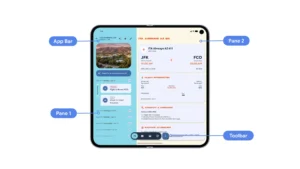
During the summit, engineering teams highlighted how multi-pane architecture patterns can transform traditional single-screen mobile applications into expansive, responsive workspaces. Early enterprise partners—including teams behind productivity tools like Notability and hardware manufacturers like Logitech—shared vital engineering strategies for optimizing pointer interactions, accommodating external hardware accessories, and designing desktop-grade workflows for emerging platforms like Googlebook. These case studies underscore a broader industry trend: users increasingly expect mobile-first applications to behave with the depth and flexibility of native desktop software when paired with appropriate hardware.
AI-Driven Tooling and Agent-Ready Development
To help development teams adopt these advanced architectural patterns without incurring prohibitive refactoring costs, Google introduced integrated support for Android skills tailored for coding agents. Whether utilizing Gemini directly within Android Studio or executing the Android CLI alongside external development agents, these specialized skills automate repetitive implementation tasks. Crucially, they are engineered to enforce compliance with official Adaptive Quality Guidelines, ensuring that AI-generated UI adaptations meet rigorous standards for responsiveness and layout stability.
Broader Industry Implications and Future Outlook
The comprehensive roadmap outlined at the Android Developer Summit reflects a mature, multi-device ecosystem focused on long-term sustainability and developer productivity. By consolidating UI development under Jetpack Compose, expanding reactive paradigms into data layers via Jetpack AppState, and providing robust tools for adaptive layouts, Google is lowering the barrier to entry for cross-platform engineering.
For the broader software development industry, these advancements signal a decisive departure from device-specific coding toward a unified, fluid programming model. As consumers continue to adopt diverse hardware form factors—ranging from pocket-sized foldables to multi-display automotive cockpits and productivity-focused desktop environments—the ability to write adaptive, resilient code will dictate the success of modern mobile applications. Developers and engineering leaders are encouraged to review the extensive catalog of technical deep dives, including sessions on Media3 playback pipelines, CameraX integrations, and large-scale migration case studies, available via the official Android Developer Summit archives.
Related posts: